
Crowds & Simulation / Houdini & Procedural Workflows / Houdini
Sand Tutorial | Using Grains Solver in Houdini
Legacy TutorialWritten guide
This tutorial is part of the CGI Nerd archive. Some software features, interfaces, or workflows may have changed since it was recorded.
Playing loads YouTube content. YouTube processes data after activation.
Watch on YouTubeIf the player is blocked or unavailable, use Watch on YouTube.
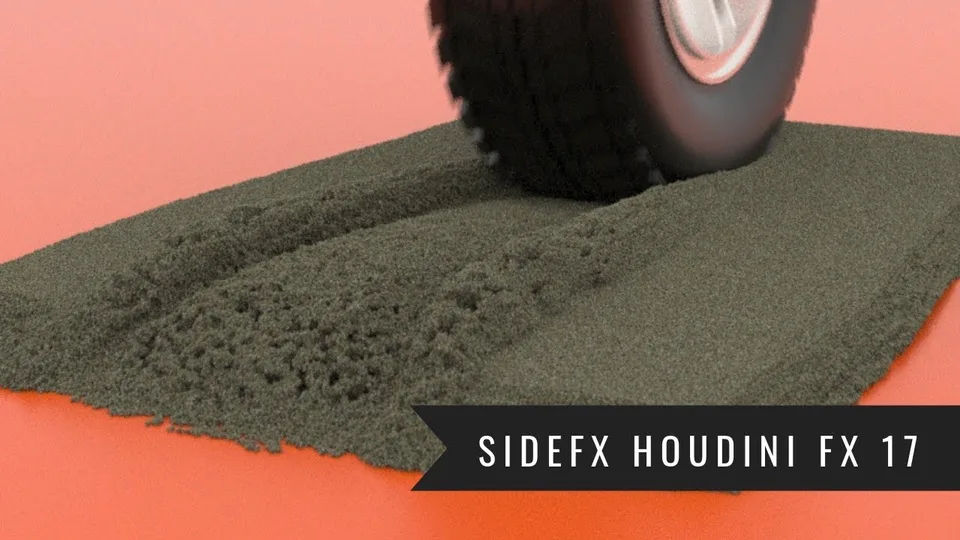
This lesson rolls a modeled tire through a shallow bed of wet sand. It first develops the motion with relatively large grains, then separates two kinds of improvement: smaller simulated particles change the physical detail, while Upres Sand adds finer render particles around the existing motion. A final sleeping-and-awakening pass keeps the outer sand bed from collapsing unnecessarily.
The scene already contains a tire and camera. The tire-modeling lesson provides the related asset construction. This recording uses the Grains shelf, a POP Solver and Grains Update; its exact Houdini version is not established. The final edge-preservation changes are shown in simulation and a flipbook, after the earlier full render, rather than in a newly rendered final sequence.
Connect tire rotation to distance traveled
At 00:46–06:00, estimate the tire radius in an orthographic view and reference its X translation into the rotation channel. The source uses an approximate radius of 16.5 while inspecting a tire around 17 units in radius; this is a visual estimate rather than a precise measurement.
The relationship is distance divided by circumference, multiplied by a full turn. For this orientation, the rotation needs a negative sign:
rotation in degrees = -360 × distance / (2 × π × radius)
This is the geometric relationship, not a complete Houdini channel-reference expression. The recording inserts the translation reference and uses 3.14 for π. It fixes parentheses after an initial result behaves incorrectly, ensuring the diameter and π form the denominator together.
Test both direction and rolling distance. A tire can rotate at a plausible rate while turning the wrong way, or rotate in the correct direction while sliding because the estimated radius is wrong. This relationship also assumes rolling without slip; it does not derive wheel motion from simulated traction.
Key the tire’s translation through the intended sand patch. The example uses a timeline of 120 frames and a translation key around frame 72. The resulting motion is checked at real-time playback speed before adding expensive grains.
Make a shallow sand volume and explicit collision surfaces
During 06:02–11:59, create a Box for the sand bed. Reference half its Y size into its Y center so the volume remains on the ground when its thickness changes. Fit its horizontal extent to the tire’s path, and check that the tire itself does not travel below ground level.
A thin layer keeps the early simulation manageable. Extra volume contains more grains without necessarily improving the visible tread region. Apply Wet Sand from the Grains shelf and first inspect its coarse particles.
The initial grains fall through the ground. Add a simulation ground plane; it does not need to be visible in the final image. Make the tire a collision object using the source’s static-object shelf workflow. The recording then shows interaction with the animated tire, although all collision-update settings are not narrated.
The first interacting result slides too far as a mass. That establishes collision, but not the desired granular behavior. Keep working at low resolution while correcting it.
Balance sliding resistance and cohesion
At 11:00–15:46, the instructor raises Scale Kinetic in Grains Update, starting around 0.8, then explores friction on the POP object and inspects the ground’s friction. These changes reduce sliding but do not by themselves create the desired tread response.
The sand is also sticking together too strongly. In the source geometry’s wet-sand control, reduce the wetness from 1 to trials around 0.2 and 0.1. The next results separate more readily instead of behaving like one rigid sheet. Particle separation is then reduced from 0.7 to 0.5 for a somewhat finer test.
Treat those as distinct diagnoses. Excessive sliding and excessive cohesion can occur together, but changing a friction control is not the same as changing the attraction between grains. The goal is sand that yields under the tire while retaining a readable impression.
For terminology, current SideFX documentation describes Scale Kinetic as reducing tangential relative motion between overlapping particles. It also warns that POP Grains collider friction does not use the collision object’s ordinary friction parameter. This is supplementary documentation, not verification of the recording’s historical build; do not assume changing the ground’s friction alone explains the observed improvement. SideFX POP Grains documentation.
Understand iterations before copying the trial settings
During 16:04–23:03, the instructor experiments with constraint iterations, clumping, kinetic scale and explicit constraints. A high iteration trial takes longer, and a value of 10 is retained during this exploration. Later examples include kinetic scale 1 and a clumping trial of 50. The source does not provide a complete final preset with every relevant field and attribute.
Constraint Iterations is a solver-quality control rather than a second wetness slider. Current SideFX documentation defines it as repeated constraint-enforcement attempts within each substep. Too few iterations can under-enforce the intended constraints, changing the apparent stiffness and stability. This clarifies why the source sees behavioral changes when increasing iterations, without establishing that its chosen count suits another grain size or pile. SideFX POP Grains documentation.
Judge the resulting tread: the tire should displace the sand, leave an indentation and avoid pulling the entire bed forward as one sheet. The video explores values interactively to achieve that balance. It does not isolate each parameter in a controlled experiment or certify a physical wet-sand material.
Give the tread room and limit activation around the tire
At 23:03–25:59, widen the original sand volume. Its earlier width was close to the tire’s width, leaving little material on either side to form a ridge. The larger bed produces a more useful shoulder around the indentation.
Apply Awaken by Geometry using the tire. The source shows a more contained response, with less of the surrounding bed being disturbed. This introduces the activation mechanism used again at the end of the lesson.
Geometry extent and activation are separate controls. A wider bed supplies material around the tire; sleeping or awakening determines which parts participate dynamically. Neither should be confused with increasing the grain count simply to improve the rendered texture.
Increase physical detail only as far as the machine can sustain
During 26:05–33:05, reduce particle separation from 0.5 to 0.3 and inspect a close render. Large grains resemble marbles at that distance, even when the wider shot looks acceptable. The source then attempts 0.1 for finer simulation detail.
Smaller separation produces more particles and more expensive calculation. The instructor saves before these changes, reports running out of memory, and says an attempted up-res at 0.1 caused the system to fail. The recording returns to 0.2 to demonstrate the next stage safely enough on that machine.
A spoken decimal is unclear at the initial fine-resolution change, but the subsequent discussion repeatedly identifies the attempted setting as 0.1 and the fallback as 0.2. Do not interpret it as a successful change to 1 or as a successful full-resolution 0.1 production run.
Inspect the coarse physical result before adding visual particles. Render refinement cannot repair a simulation that moves like an oversized lump, leaves the wrong tread shape or has an implausible scale.
Up-res the render particles without inventing new motion
At 33:05–39:04, select the grain-particle geometry and apply Upres Sand. The source first shows 10 points per point, then explores 20. The render becomes finer and less marble-like while the existing simulated motion remains the basis for the result.
Current SideFX documentation confirms this distinction: the tool replaces each original particle with a cluster that follows its motion, and Points per Point controls the cluster count. It adds visual texture without simulating independent new motion for every render particle. SideFX Upres Sand documentation.
This does not make the operation free. The source’s earlier crash occurred while trying to up-res an already expensive simulation, so the demonstration itself shows a memory boundary. More render particles still need to be represented and rendered.
The instructor later reaches a compromise at 0.15 particle separation and successfully applies up-res there. A still looks finer, and a full sequence is rendered. This 0.15 result, rather than the failed 0.1 attempt, is the demonstrated compromise.
Keep the outer bed asleep and inspect the final limitations
During 39:04–45:38, the completed render reveals a floating-looking tail of sand and collapsing outer edges. The instructor attributes the first issue to scene scale and proposes changing scale or gravity. That repair is not demonstrated or rerendered.
For the edges, return to a cheaper particle setup and open the POP Solver’s Sleeping controls. Enable Auto Sleep, return to frame one, and enable Start Sleep so the sequence begins with the bed inactive. Together with the existing Awaken by Geometry setup, the tire can disturb its local region while the outer bed retains its shape in the shown test.
This is not a global freeze: the tread region still becomes active. The source also reports faster calculation because much of the bed remains asleep, but it does not provide a performance benchmark or establish that sleeping particles incur no processing at all.
Awaken Nearby is then added to spread activation beyond the immediate contact area. Its fog-like visualization shows the region spreading through the bed, and the threshold is discussed as a way to change its reach. Inspect that spread over time: increasing it can activate more of the outer material that the previous setup was trying to preserve.
The final evidence is a simulation/flipbook comparison at reduced particle count. The earlier rendered sequence still contains the scale and edge problems. A responsible next step is to apply the chosen activation behavior at the intended simulation detail and render it again, rather than treating the final low-cost preview as an already completed high-resolution result.