
Houdini & Procedural Workflows / Houdini
How to Make a Car Tire in 3D | Houdini Tutorial
Written guide
Playing loads YouTube content. YouTube processes data after activation.
Watch on YouTubeIf the player is blocked or unavailable, use Watch on YouTube.
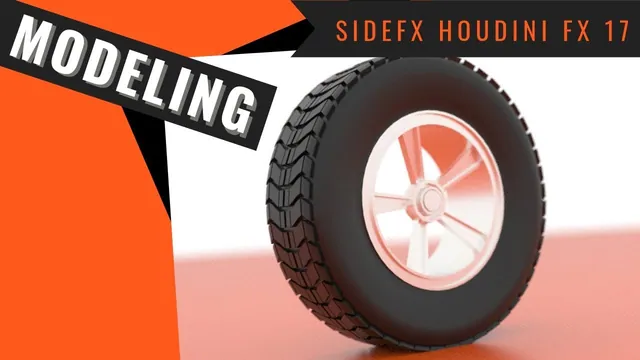
This lesson models a tire by shaping one repeatable section and distributing it around a circle. It then builds a simple rim, separates rubber and metal for material assignment, and stages a preview render. The useful procedural idea is that a local tread edit can change the whole circumference without manually remodeling every repeated section.
The result is intended to read well from a distance. The instructor explicitly prioritizes appearance over precise wheel construction. The exact Houdini release is not established, and some face selections and transform settings are visual rather than fully described in the automatic captions. This guide therefore follows the demonstrated construction and diagnostics without presenting a complete parameter preset or a dimensionally accurate automotive model.
Shape a tire section before repeating it
At 00:18–05:02, create a geometry object for the tire and begin with a Grid. Adjust its dimensions and divisions so the polygons are reasonably square and there is enough geometry for bending and later tread edits. The instructor tries several division counts; the objective is a workable section, not a particular count that every tire requires.
Use Bend to turn part of the grid downward into the side of the tire. Its capture length determines how much of the section participates in the deformation. Changing that length changes the profile even when the bend angle remains the same. The source tightens the shape and goes slightly beyond a right-angle bend, using about negative 100 degrees in this example.
Mirror across the appropriate axis to create the opposite half. Move the grid and adjust the bend’s capture position so the two halves meet at the middle. Inspect the profile before building the full tire: width changes and capture-position changes can both affect where the mirrored halves meet.
The source explores curve types while creating the circular distribution, then proceeds with a polygon circle. Its radius establishes the overall tire size; its divisions establish the number of repeated sections around the circumference.
Align the section to the circle, then close its seams
During 05:02–11:06, connect the section and circle through Sweep. The first result is oriented incorrectly. A Transform on the section rotates it into the appropriate orientation before it is distributed. Inspect the repeated result while changing this upstream transform so that an axis correction is judged in the context of the whole tire.
More circle divisions produce more repeats and also change the spacing of the tread pattern that will be developed. The section width must be considered alongside that spacing. A section that seems reasonable in isolation may overlap its neighbors after distribution.
Another Bend is used for its taper controls to narrow the relevant portion of the section. The capture direction and up vector initially point along the same axis; the instructor changes the up vector so they no longer conflict. Set the capture length to include the intended geometry, then adjust the taper while displaying the downstream Sweep.
Add Fuse to join nearby seam points. Increase its distance only enough to close the intended seams. This threshold is especially important because the next stage introduces smaller tread details: a distance that looked harmless on the plain tire can later collapse those details.
The first checkpoint is a coherent tire shape with neighboring sections meeting cleanly. Do not use a large Fuse distance to hide substantially misaligned sections. Correct their placement or taper first.
Develop the tread while preserving repeat boundaries
At 11:06–19:31, return to the section upstream of Sweep. Selected faces are widened to reduce overly large gaps, and selected points are moved to form a chevron-like tread pattern. The key constraint is correspondence at the repeat boundaries: changes on one side must remain compatible with the matching side of the neighboring section.
PolyExtrude raises selected tread faces. The source also removes an unwanted interior face and revises the design by undoing an earlier extrusion, moving points closer together, and extruding a more selective region. These are deliberate shape revisions rather than additional layers that should all remain in the final network.
Inspect both the Sweep and the Fuse output after these edits. In the demonstration the Sweep shows the intended tread, while Fuse damages it because its earlier distance is now too large. Lowering the distance preserves the new detail while still joining the intended points.
That comparison gives a useful diagnostic:
- If the repeated geometry is already wrong before Fuse, inspect the source section, its boundary correspondence and its distribution.
- If the repeated geometry looks right but deteriorates after Fuse, inspect which points fall inside the merge distance.
- If the tire looks too flat or angular, adjust the upstream section rather than editing every repeated piece.
The instructor makes further local shape adjustments for a more bowed profile and adds a final extrusion for thickness. Exact selected face indices are not narrated, so follow the visible topology rather than assuming an identical selection after changing the grid divisions.
Build a simple rim from repeated spokes and separate tubes
During 19:31–37:01, a box becomes the basis for a spoke-like piece. Another circle and Sweep repeat it around the center. The circle is enlarged and switched to polygon geometry after an initially unsuitable result. Transforms orient the source, and the repeat count is reduced to approximately five for the chosen design.
The box is tapered and shaped with direct component edits, then inset and extruded to introduce depth. A Bend is considered but set aside because this source piece has too little geometry to benefit from that approach. For this simple form, editing the existing faces is enough.
A capped polygon tube supplies the central part. Its front is inset and pushed inward to make a recess. An attempt to reuse that geometry for the outer rim is discarded because its circumferential resolution is insufficient for the larger silhouette. A separate tube with more columns provides a smoother outer ring without forcing the central piece to use the same density.
The outer ring is shaped through insets, extrusions, face removal, edge scaling and a Fuse operation. One extrusion affects too much geometry because the selection is wrong; the instructor corrects the selection and repeats it. This is another reason to inspect the active component selection before changing an extrusion value.
Final transforms adjust the rim and tire depth so they sit together convincingly. These are visual fit adjustments. No brake assembly, structural dimensions or engineering fit is established.
Distinguish the discarded bolt layout from the final hubcap
At 37:01–49:00, the instructor experiments with small copies of tube geometry as bolts. Much of this section explores how translation, pivot position and rotation interact. The intended behavior is an object orbiting the wheel center; rotating around the bolt’s own center cannot create that arrangement.
Several transformed copies are placed at different angles and their distance from the center is adjusted. However, the instructor ultimately removes the bolt setup and replaces it with a larger central hubcap-like piece. A series of insets and inward/outward extrusions gives that piece a simple stepped profile.
The final model should therefore not be described as a completed procedural bolt-distribution system. The trial is useful for understanding why the rotation center matters, but its unstable parameter experiments are not a reliable recipe to copy. The finished design follows the simpler hubcap branch.
Separate material membership from the combined geometry
During 49:00–53:53, merge the rim components into their own branch and create a rim group. Create a separate group for the tire geometry. Material assignments then target those two memberships after the components are assembled.
This separation matters because both materials can exist in the scene while still being assigned to the wrong faces. Inspect group membership as well as the shader path if the whole wheel becomes metallic or the rim receives the tire material.
The rubber treatment is a simple dark shader. For the rim, the instructor chooses a silver material from the available presets. Despite the broad opening description about texturing, the source does not demonstrate UV layout, image textures, tread displacement maps or a physically measured rubber shader. The tread detail is modeled geometry.
Stage a preview that makes the silhouette and materials readable
At 53:53–57:31, make a large circular ground surface and raise the tire into position. The instructor chooses a circle to avoid the obvious corner of a rectangular ground plane from some viewing angles. It still needs to be large enough for the chosen camera framing.
Add an environment light, create a camera from the viewport, lock it while adjusting the composition, and inspect a preview render. The ground later receives an orange shader, changing the reflected color visible on the wheel. That is part of the presentation, not a change to the tire’s geometry or material grouping.
Judge the result at the intended viewing distance: the tire silhouette should be continuous, the tread should survive seam joining, the rim should sit inside the tire, and rubber and metal should remain visibly distinct. The lesson reaches this simple rendered presentation. It does not establish animation readiness, production UVs, close-up mechanical accuracy or a version-independent rendering setup.