
Character FX & Animation / Houdini & Procedural Workflows / Houdini
Procedural Character Modeling in Houdini
Written guide
Playing loads YouTube content. YouTube processes data after activation.
Watch on YouTubeIf the player is blocked or unavailable, use Watch on YouTube.
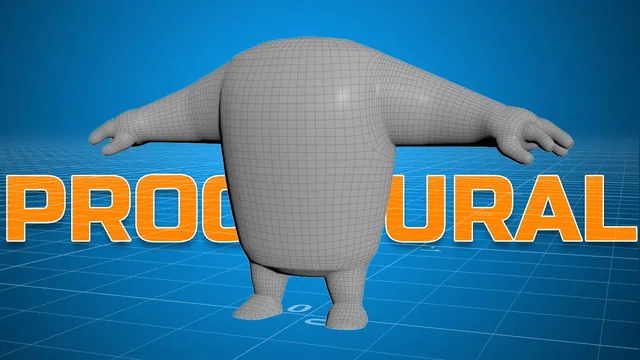
This modeling session uses the lines and points from the KineFX skeleton lesson as guides for a stylized character mesh. Sweeps form the body, limbs and fingers; ramps control their profiles; a sphere forms the palm; and a final union, mirror and remesh combine the pieces.
The result is a procedural modeling network with useful adjustable parts, not a finished digital asset. The instructor explicitly notes that moving one part still requires manual changes elsewhere. The character has no separate head by design, and adding a switchable head is only proposed. The exact Houdini build is unverified, and final reshaping occurs partly off camera.
Branch from the skeleton lines without resampling the joints
At 02:00, start a new geometry branch from the existing spine line. Add Sweep. Its initial error comes from expecting a second input; switching to a built-in round-tube cross-section removes that requirement. Add caps, template the skeleton and adjust the radius to see the body form around the guide.
Use the scale-along-path ramp for an initial silhouette. When there are too few samples to represent the profile, insert Resample in this modeling branch. The joint-defining source line remains distinct from the denser curve used to build geometry. This prevents a modeling-resolution change from being mistaken for a decision to add more skeleton joints.
The source changes ramp interpolation from linear to B-spline and adjusts the profile’s transitions. Increase the Sweep columns to 20 in the example. Radius sets the overall thickness, while the ramp varies thickness along the path. The first approach remains too radially symmetric for the intended body, which motivates the next control network.
Build separate profile ramps through a vector scale attribute
At 05:00, insert a Point VOP on the curve before Sweep. Use Bind Export for a vector attribute named scale. A temporary vector parameter tests whether this attribute affects the generated surface: zeros collapse it, and restoring components to one recovers the shape. This is an attribute consumed by the sweep, not a transform applied to the entire completed character.
Enable the Curve U attribute on Resample and read curveu in the VOP network. Feed it to a scalar ramp so each sample along the curve gets a profile value. The recording changes the ramp from its initial color-oriented form to a scalar spline ramp and uses Float to Vector to assemble the scale components.
At 10:01, create distinct front and side profile ramps from the same curve coordinate. A copied ramp is initially connected incorrectly and is repaired before both profiles respond. The remaining vector component starts at one; a third ramp, labeled for top and bottom, later controls that component too.
The labels describe how the controls affect this particular sweep orientation. Do not assume that “front” always means the same world-space component after changing a guide’s direction. Inspect the resulting geometry in multiple views. The third ramp can flatten or round the ends in the source, and a negative-value experiment makes a concave form; this is an observed shape test, not a guarantee against folds or self-intersection.
Use the ramps to establish chest, waist and belly proportions. Adjust existing ramp points deliberately: the instructor repeatedly adds an unwanted point while trying to move one. A smoother-looking control graph is useful only if the sampled mesh actually follows it at the available resolution.
Reuse the profile system for the arm and palm
At 17:01, add output nulls for the source lines and use Object Merge to bring them into organized modeling branches. Copy the Resample, Point VOP and Sweep approach for the arm, then change the imported line. The copied body settings make the arm much too large, so reduce Sweep radius before refining its ramps.
Merge the body and arm for inspection. Their initial shapes do not overlap adequately. Move the arm guide inward and later widen the body profile to improve that junction. This also reveals the network’s incomplete dependencies: moving the arm does not automatically reposition every hand point. Those related source points must be adjusted separately.
At 23:02, create a sphere and copy it to the single palm point. Rotate and scale the sphere into a flattened palm form, then adjust the palm point so it overlaps the wrist. The narration changes axes during these adjustments; use the resulting hand orientation, rather than treating every tentative axis choice as a final instruction.
Return to the arm ramps to shape a fuller shoulder, a narrower elbow and wrist, and separate biceps and forearm masses. Sweep radius remains the overall multiplier. Distinguish a local profile adjustment from widening the whole limb: changing the latter can undo a carefully proportioned wrist or palm connection.
Form the fingers, legs and foot with local adjustments
At 30:06, copy the arm’s smaller profile system for the middle finger and reduce its radius further. Change resampling from length-based spacing to a segment count when a predictable number of samples is more useful. Simplify the inherited ramps and add the intended finger-pad silhouette.
Duplicate the branch for pinky, index and thumb, changing each Object Merge source and adjusting size. The hand is the same stylized three-finger-plus-thumb design as the skeleton. Finger positions are moved individually to overlap the palm; a better hand construction from wrist toward the middle-finger point is discussed but not implemented.
At 38:02, expose the leg and foot lines and reuse the arm branch for the leg. Adjust the leg’s direction for a slight outward angle, then reposition the separate foot guide visually. A direction trial near a 45-degree lean is too extreme and is reduced. Refine the calf, knee and ankle profiles, with a 20-segment resampling example used to represent the shape more clearly.
The foot also begins as a sweep, but its guide starts apart from the ankle and the copied radius is far too large. Reduce it, simplify the ramps, lengthen and move the foot line, and adjust the ankle end until the parts overlap. The foot’s resampling is reduced to about eight segments during this work. These are individual modeling choices rather than a universal limb-resolution rule.
At 50:01, create a Box cutter and use Match Size to position it relative to the foot. The intended relationship aligns the box’s maximum extent with the target center for the sole cut. A Boolean produces a flat-bottomed foot after an input/operation check. The captions do not identify every alignment-axis setting clearly enough to reproduce that cutter solely from text; inspect the demonstrated overlap and resulting sole in the video.
Join the parts and repair the mirrored remesh workflow
At 52:02, merge the modeled pieces and Boolean Union them into connected geometry before remeshing. The instructor uses an already licensed Exoside Quad Remesher integration available in the scene’s Labs tools. A Houdini beta alternative is mentioned, but not tested as an equivalent workflow. The recording’s comments about trials or purchasing are historical context, not current availability or a recommendation to buy software.
The remesher initially errors. Reconnecting the license does not immediately resolve it; changing a parameter then makes it evaluate. This sequence does not establish licensing as the sole cause or a reliable universal fix. Target values around 2,000 and 1,500 are tried, with further adaptive-size adjustments and intermittent errors.
The internal symmetry option does not produce the intended mirrored character. Clipping the source half still does not resolve the result by itself. The accepted correction near 55:00 uses the clipped half, keeps the demonstrated PolyFill disabled, and adds an explicit Mirror before Quad Remesher. The full mirrored geometry then goes through remeshing, producing the shown character shape.
Inspect the center seam, joined limb regions, fingers and sole after this sequence. A successful remesh preview does not itself establish deformation-ready topology or good capture weights. The source says the mesh can now be bound to the skeleton, but binding and animation are not performed here.
The final pass makes the character shorter and more squat by adjusting settings and moving joints, partly while recording is paused. That is consistent with the opening limitation: many controls exist, but automatic relationships between all parts have not been completed. The demonstrated result is a flexible starting mesh aligned around the skeleton, with a known working union/mirror/remesh order and further asset-building work still required.