
Character FX & Animation / Houdini & Procedural Workflows / Houdini
Creating a KineFX Skeleton in Houdini
Written guide
Playing loads YouTube content. YouTube processes data after activation.
Watch on YouTubeIf the player is blocked or unavailable, use Watch on YouTube.
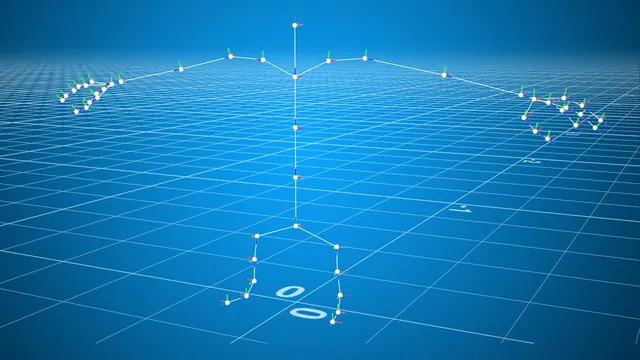
This process video builds a stylized character skeleton from lines and points before a character mesh exists. Each line supplies a small joint chain; names, transforms, hierarchy and mirroring turn those pieces into a usable starting skeleton. The character has a compact body with the head integrated into its core, short legs and three fingers plus a thumb on each hand.
The source explicitly presents an exploratory workflow with corrections. It ends at the skeleton, leaving geometry, capture weights, APEX controls, motion capture and crowds for later work. Exact Houdini version evidence is absent. The guide preserves that scope and the important final change from parenting after the mirror to parenting before it.
Establish a central chain and inspect its joint data
At 01:06, create a Line inside a Geometry object named for the skeleton. Its first point begins near the pelvis and its last point reaches the top of the character. The intended overall height is about one meter. The captions lose some decimal punctuation in the placement discussion, so use that proportional goal and the visible geometry rather than treating every spoken “unit” as a reliable numeric field value.
Increase the line to five points for pelvis, waist, chest, head and head top. Point order determines the direction of this chain: the pelvis is the starting parent end. Add Rig Doctor to prepare the joint data, followed by Rig Pose for an initial movement test. If the Rig Pose node is selected and displayed but the joints cannot be selected, enter its viewport state with Enter.
The geometry spreadsheet initially shows automatic point-based joint names. Rig Doctor’s Initialize Missing Names supplies those defaults. Temporarily disabling it demonstrates that the names disappear; it is a fallback, not a substitute for the character’s naming scheme.
At 05:00, add a Name SOP upstream of Rig Doctor, set it to points and assign each point number to an explicit entry. The first name seems absent because extra multiparm entries have not yet been given their intended selections. Completing the point-number assignments resolves the overwrite behavior. Keep the center prefix, anatomical label, joint suffix and capitalization consistent, then inspect the point names downstream.
Build bent limb chains and eliminate copied names
At 09:00, add a downward-facing Line for the left leg and merge it above Rig Doctor. Three points represent hip, knee and ankle. Raise the ankle slightly above the eventual foot contact level. A point-filtered Transform offsets the middle point in Z to introduce a slight knee bend; an initial larger bend is reduced.
The leg’s Name SOP needs point-class assignments too. When the spreadsheet does not show the expected names, the instructor discovers it is still set to primitives. Fixing the attribute class restores the hip, knee and ankle names. A merged display and a brief Rig Pose test confirm that the new chain is being processed.
At 14:02, duplicate the line-based approach for the arm, change its direction to positive X, and place it at the intended shoulder height. Reverse the middle-point Z offset so the elbow’s slight bend faces the chosen direction. Shorten the chain when its first proportions would reach too far toward the intended fingertips.
Copied naming nodes initially duplicate the leg’s names. Replace them with shoulder, elbow and wrist identifiers before continuing. The source emphasizes that left and right are defined from the character’s perspective, not the viewer’s screen. A left-side chain can therefore appear on the right of a front view without being mislabeled.
These are deliberately stylized proportions. The process does not establish an anatomically accurate human skeleton, joint limits or final deformation quality. The small bends supply a readable initial pose; a later rigging system would still need its own behavior checks.
Mirror only the named side and initialize transforms first
At 18:01, insert Skeleton Mirror after Rig Doctor. The first error reports a missing point transform. Enable Initialize Transforms in Rig Doctor before trying to mirror the skeleton. A point can have a useful name and position while still lacking the transform data needed by the next operation.
The first successful mirror duplicates the center chain as well as the side limbs. Restrict the mirror group to names beginning with the left-side prefix, then replace that prefix with the corresponding right-side prefix in the mirrored names. The wildcard approach is intended to include later left-hand and left-foot additions automatically.
Use the actual spelling and case of the assigned prefixes when setting the pattern. The source demonstrates the name-attribute selection concept; its automatic captions are not a dependable character-for-character copy of the group expression. Verify the field against the joint names rather than guessing from a phonetic caption.
A Rig Pose before the mirror can change the source side’s proportions or pose and let the other side follow symmetrically. The instructor demonstrates that relationship and resets all transforms to defaults afterward. Inspect the result for a single center chain, one left chain and one right chain with distinct names. Merely seeing symmetric lines does not prove that the names or transforms are correct.
Add the hand, clavicle and foot as separate branches
At 21:01, build the middle finger from another three-point Line. Point-specific transforms add a slight curve, and the first version is shortened to suit the stubby character. Use numbered middle-finger names so the joints remain distinguishable without excessively long labels.
The instructor first considers omitting a palm joint, then adds a single point for it. The intended hierarchy is fingers under palm, and palm under wrist. A second single-point branch supplies the clavicle. The source places it for this stylized design rather than claiming a precise anatomical landmark.
Name both points and merge them with the other chains. The Name SOP point-class mistake recurs and is corrected. Renaming the network nodes and rearranging Merge inputs makes the graph easier to read, but this organization is not the final parenting step; Parent Joints is still needed later.
At 31:08, duplicate the finger setup for the pinky, then the index and thumb. The pinky is initially positioned on the index side, so its placement and direction signs are corrected. Rename every copied chain, adjust the lengths and move the thumb so it branches back from the palm with a different curve. The result has middle, index and pinky fingers plus a thumb, not a five-finger human hand.
At 39:02, a two-point Line supplies the ball of the foot and toe tip, facing forward along Z and placed relative to the leg. Give both joints left-side names and merge the branch. Confirm that the existing mirror pattern also includes these new names. A later apparent visibility issue is resolved by entering the viewport state; the source does not identify it as a broken skeleton conversion.
Parent the source side before mirroring the finished hierarchy
At 41:03, the instructor nearly ends the lesson, then identifies the missing step: connecting the separately built chains into the intended hierarchy. Add Parent Joints and use the Rig Tree to inspect and edit parent relationships.
The first attempt parents after mirroring, requiring left and right branches to be handled separately. That node is removed and Parent Joints is moved before Skeleton Mirror. The corrected order allows the completed source-side relationships to be mirrored together, reducing duplicated work and opportunities to attach a joint to the wrong side.
The demonstrated relationships include the hip under the pelvis, shoulder under clavicle, palm under wrist and finger roots under palm. For this compact character, the clavicle is attached to the head joint; the instructor explicitly contrasts this with the more usual chest-region attachment for a differently proportioned character. Keep that design-specific choice visible rather than turning it into a general rigging rule.
The ball-of-foot branch is also attached into the left leg hierarchy, but the spoken target name is truncated. Confirm the exact ankle/foot attachment in the video’s Rig Tree rather than treating this article as a complete parent table. Selecting the intended branch roots matters: the existing internal finger and limb chains should retain their relationships.
After mirroring, inspect the whole Rig Tree and pose representative branches. Check that the center remains unique, both sides have matching naming conventions, fingers follow their palm, and the mirrored relationships match the source side. The recording finishes with a skeleton ready for the next modeling stage. Attaching an existing mesh is mentioned as another use, but neither skin capture nor a finished animation rig is demonstrated in this lesson.