
Houdini & Procedural Workflows / Houdini
Modeling Stylized Procedural Rock Formation Structures - Houdini Tutorial
Written guide
Playing loads YouTube content. YouTube processes data after activation.
Watch on YouTubeIf the player is blocked or unavailable, use Watch on YouTube.
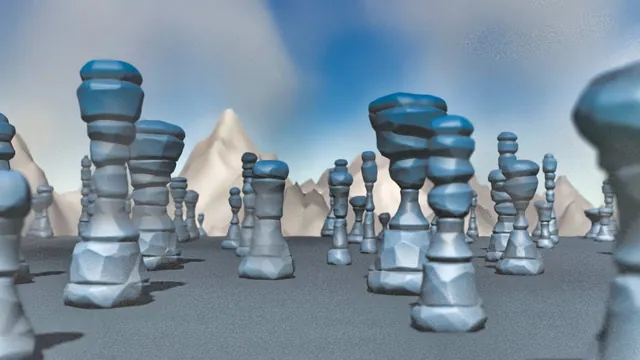
This lesson builds a stylized rock pillar, exposes its shape controls, and distributes varied copies across a landscape. The pillar begins as a capped tube. Large-scale displacement creates stacked rock-like bands, a second displacement adds irregularity, and a color ramp emphasizes the same structure. The final section applies the approach to an arch and a sphere.
The recording is a complete exploratory workflow, including a failed heavy copy operation, a rebuild, expression repairs, and revised distribution settings. It uses Point VOPs, Copy Stamp, and Mantra. The exact Houdini release is unverified; the later Copy to Points lesson discusses a different approach to copy variation. Here the historical stamping workflow is retained so the explanation follows the source.
Establish a pillar that stays on the ground
From 01:08, create a polygon Tube with end caps. Copy its height parameter and paste a relative reference into Center Y, then divide the referenced height by two. Since the tube grows around its center, moving the center upward by half its height keeps the base at the ground while the top rises.
Test that relationship before adding deformation. Changing the height should move the top without pulling the base below the ground. The same height will later drive the Bend capture length, so it becomes a useful shared dimension rather than a value repeated manually in several places.
Increase the Tube’s rows to produce more evenly proportioned faces and add Subdivide. The dense surface gives displacement enough points to describe the rock shapes. The instructor increases subdivision during look development but later reduces it from eight to six because the scene becomes slow. Those are recorded trials, not recommended subdivision depths for every model: inspect the point count and responsiveness before copying the result many times.
Preview the large rock pattern as color before displacing it
Around 03:02, create a Point VOP and feed position P into Unified Noise. Connect the noise to color temporarily so its pattern can be read on the surface before it changes the geometry. The instructor also briefly connects position directly to color to illustrate how three spatial components can appear as color channels.
The first noise is changed away from Simplex, and its directional frequency settings are adjusted to create broad horizontal formations rather than equally sized detail in every direction. Several values are tried and revised. The useful target is a pattern that suggests large rocks stacked vertically, with narrower transitions between them.
Add Fit Range to remap the pattern. Narrowing or shifting that mapping changes how strongly the dark and light portions separate. The instructor uses the color preview to judge where the future protrusions and recesses will occur, then switches to Displace Along Normal around 07:04. The remapped value drives displacement amount, and the displaced position is connected to output P.
Now judge the silhouette as well as the color. Frequency controls the spacing of the pattern; the range mapping controls its distribution; displacement scale controls its geometric strength. Changing all three at once makes it difficult to know why a result improved. The recording repeatedly moves between them to find small gaps and broad rock masses instead of extreme spikes.
Shape the overall column and coordinate its color
From 11:01, place a Bend before the first Point VOP. Set its capture direction along positive Y and reference the Tube height for Capture Length. The initial capture region is too short; matching it to the pillar’s height lets the deformation influence the full column.
The node is then used mainly for Taper and Squish. Taper changes the relationship between the top and bottom widths, while Squish changes the middle of the silhouette. These broad shape changes happen before the rock-detail displacement, so the procedural pattern follows an already shaped base.
Around 14:02, insert a Ramp Parameter in the color path. The instructor chooses a lighter rock tone and a darker, less saturated companion, then adjusts the ramp’s positions to concentrate the dark areas near the creases. The first palette is warm and clay-like; later it is changed toward cooler, desaturated stone colors.
The resulting dark creases are described as resembling ambient occlusion. They are driven by the procedural pattern and color ramp, not by a demonstrated occlusion bake. Keep that distinction in mind when judging the look under different lighting: the color treatment suggests depth even before a lighting calculation accounts for it.
Add a second level of irregularity
At 18:06, add another Point VOP with a similar noise-to-displacement arrangement. A temporary color connection helps inspect this second pattern, but the instructor does not retain a new color treatment at this stage. The existing rock colors should survive while the geometry gains additional irregularity.
Reduce the displacement amount when the first result is too strong, then adjust it until the surface looks less uniform without destroying the large stacked shapes. A later Mountain experiment adds another small perturbation. These operations are judged by their contribution to the silhouette and surface, not by a single fixed recipe of noise values.
Add a ground Grid and use a modest Mountain deformation so the base landscape is not perfectly flat. The instructor also creates a camera and organizes nodes into labeled regions. This separates the base shape, procedural rock treatment, and scene assembly before controls and copying make the graph more complex.
Expose controls with clear responsibilities
From 27:00, create a Null called Controls and edit its parameter interface. Hide the unused existing controls and add floating-point parameters for the pillar height, width, taper, squish, rock height, rock width, and seed. Set useful defaults and use Copy Parameter/Paste Relative Reference to connect them to the relevant nodes.
The controls have different meanings:
- Height drives the Tube’s height; the ground offset and capture length already follow it.
- Width drives the Tube’s radius scale as a single value.
- Taper and Squish drive the corresponding Bend parameters.
- Rock Height drives the first noise’s Y frequency.
- Rock Width drives the horizontal noise frequencies.
- Seed drives noise offset values, changing which part of the noise field is sampled.
The name Rock Height is an artistic interface label. In the demonstrated connection it drives frequency, so a lower value produces fewer, taller-looking layers and a higher value produces more small layers. Do not interpret it as a direct measurement of the height of an individual stone.
The initial control examples include a pillar height of 8, width scale of 1, taper of 0.6, squish of 0.85, vertical noise frequency of 0.8, and horizontal frequency of 0.15. These document the starting look, not a final immutable preset. Changing the offset seed away from its earlier value changes the formation; restoring the earlier offset returns the prior pattern in the demonstration.
Test each control on the single pillar before moving on. A visually unchanged result can indicate an unconnected parameter just as easily as a subtle setting.
Start copying with a small point count
At 42:00, Scatter supplies points on the ground and Copy Stamp places the rock geometry on them. The first attempt uses too many points for the dense source and becomes unresponsive. The instructor pauses and rebuilds the setup, then explicitly reduces the default scatter count from 1,000 to 10 before trying again.
This recovery is part of the lesson. A single pillar that feels manageable can become expensive when its procedural construction is evaluated for many copies. Begin with enough points to inspect variation, and save before a large increase.
After the rebuild, adjust the ground dimensions to bring the ten pillars into a useful area, replace the original single-rock connection in the final Merge with the copied result, and change the Scatter seed to compare layouts. Distribution and shape variation are separate controls: the Scatter seed changes where pillars appear, while stamping will change the geometry generated for each point.
Repair the first stamped parameter before repeating it
From 45:01, disable Transform Cumulative and define a height variable on Copy Stamp. Its value uses a random number seeded by the target point number, remapped with fit01 into a chosen height range. The corresponding upstream control reads that variable through a stamp expression.
Several mistakes are corrected before this works. The random call needs its own closing parenthesis inside the range-remapping expression. The stamp lookup needs the copy-node path first, then the variable name, then a fallback value. The node’s Stamp Inputs option also needs to be enabled. The captions do not reliably preserve every final path and delimiter, so this article does not turn the spoken fragments into purportedly exact executable code.
The instructor temporarily applies ranges appropriate to a smaller-valued parameter and gets squashed pillars, then restores a useful height range such as 5–10. This separates an expression that evaluates successfully from a parameter range that produces the intended shape.
To vary the random sequence, alter the point-number seed inside the random function. Multiplying the already generated height outside that function would change the output scale instead. The recording explicitly moves the multiplier into the seed expression to obtain a different distribution of values.
Repeat the working pattern for width, taper, squish, and rock-layer frequency, using different seed multipliers. Initial wide ranges are narrowed when the forms become too extreme. A misspelled rock-height variable prevents the expected layer changes until its spelling is corrected around 1:03:04. When one control seems unresponsive, compare the variable name at both ends before increasing its range further.
Balance landscape density and rendering cost
Around 1:04:01, enlarge the distribution area and test a count of 100 after saving. The instructor then revises the final composition to a 100-by-100 ground with 50 points so it calculates faster and gives the pillars more space.
Ground area and point count solve different composition problems. Increasing the area spreads the same number of pillars farther apart; increasing the point count adds more pillars and more work. The final choice follows a camera view rather than a requirement to use the largest count demonstrated.
The finishing render uses an environment/skylight, a ground color, and camera depth of field. The instructor adjusts the camera’s focus handle and enables depth of field in Mantra. A brief attempt to reposition the shot occurs while the camera is unlocked, then the camera is locked before composing again.
Additional mountains and scattered small rocks are suggested to enrich the environment. They are not developed into a completed secondary scattering system in this recording.
Reuse the rock treatment on an arch or another base shape
From 1:10:03, disconnect the copied assembly to inspect a single source again. Create a Torus, rotate it, and use a Box with Boolean to form an arch-like base. Feed that shape into the rock treatment.
The first result is affected by controls that still reference the earlier stamping arrangement. The instructor removes those channels for this isolated experiment, then discovers that the new branch lacks subdivision. Adding Subdivide supplies the geometry needed for the displacement to read properly.
A Switch is introduced to choose between source shapes, and a polygon-mesh Sphere is added as another possibility. The lesson suggests driving that switch through stamping to distribute different kinds of formation, but it does not finish and validate a full mixed-shape landscape after these experiments.
The transferable construction is the separation between a base silhouette, procedural surface treatment, exposed controls, and distribution. Changing the base shape can broaden the result, provided the new branch has suitable geometry and its control references still belong to the network being evaluated.