
Crowds & Simulation / Houdini & Procedural Workflows / Houdini
How to make 3D Smoke Effect | Houdini Tutorial
Written guide
Playing loads YouTube content. YouTube processes data after activation.
Watch on YouTubeIf the player is blocked or unavailable, use Watch on YouTube.
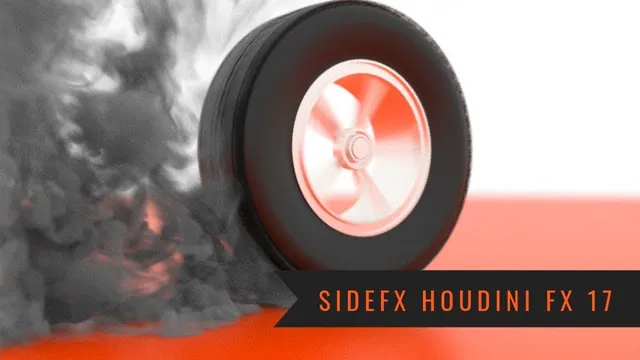
This lesson adds a billowing smoke effect to a spinning tire. It starts with a small emitter at the contact area, then works through collision, simulation bounds, density, temporal sampling, shape controls and a final render. The most useful comparisons separate problems that can look similar: thin rendered smoke, clipped smoke, coarse volume detail and irregular motion require different inspections.
The scene already contains the wheel, camera and presentation setup. The tire-modeling lesson explains the related modeled asset and simple shading. This recording uses the historical Billowy Smoke shelf workflow and Mantra; its exact Houdini release is not identified. It does not demonstrate rebuilding the effect with a modern sparse-pyro workflow.
Fit an emitter to the tire’s contact region
During 00:51–03:03, create a Box inside a separate smoke-emitter geometry object. Reference half its Y size into its Y center so its lower edge remains on the ground as its thickness changes. Fit its width and depth to the tire’s contact area rather than using a large source that fills the whole wheel.
The emitter is a source region, not the tire geometry itself. Changing its dimensions changes where smoke begins and how much space is available for emission. This lets the effect be adjusted independently of the detailed tread model.
Apply Billowy Smoke from the Pyro Effects shelf. The generated network includes simulation, sourcing and import nodes. Keep those roles distinguishable when navigating the setup: modifying the source is different from changing the solver or the imported renderable volume.
Establish collision and enough room around the shot
At 03:03–07:01, smoke initially passes through the tire. The instructor makes the tire a static object through the shelf workflow, and the next simulation shows smoke wrapping around its geometry.
Inspect both the overall simulation container and its resizing behavior. The large bounds define the available simulation region, while the resize container limits the active area as the smoke evolves. Expand and position the region so the visible smoke can leave the camera frame without being cut off at a nearby edge.
This is deliberately a shot-specific setup. A boundary outside this camera may be acceptable for the chosen composition, but that does not establish a reusable simulation that works from every angle or over a longer duration.
Animate the tire and distinguish clipping from smoke dissipation
During 07:01–10:01, the tire is keyed on Z rotation from zero at frame one to roughly 3,000 degrees over the intended short sequence. The source later settles on 48 frames, described as two seconds. The demonstration attributes part of the smoke’s motion to the rotating wheel.
Although the shelf object is called static, the lesson uses an animated wheel. The captions do not explicitly establish every collision-transform update setting. Verify the collider’s animated representation in the relevant Houdini version before assuming a similarly named shelf object will reproduce the interaction automatically.
The expanding smoke develops a flattened top when it reaches the resize boundary. Increase padding so the active region grows ahead of the visible smoke. The spoken intermediate padding values are inconsistent, so they should not be copied as a dependable numeric sequence. The meaningful test is whether the boundary stays ahead of the moving plume throughout the visible shot.
Dissipation changes how smoke fades. It does not repair a hard spatial cut caused by insufficient bounds. If the smoke ends against a flat plane, inspect the container before changing its appearance controls.
Compare source density in the viewport and render
At 10:01–14:01, the first render looks much thinner than the viewport. Return to the emitter’s generated density-source nodes rather than assuming the viewport is an accurate preview of final opacity.
The source explores particle scale, particle separation and density scale. Decreasing separation creates a denser sampling of source points; changing the density scale alters the amount being sourced. These controls are not interchangeable. The instructor uses an exaggerated density increase and checks another render, which appears substantially thicker.
The exact large density value is not reliably stated in the captions. Judge the demonstrated comparison instead: the change is evaluated in the same render context, then retained because the stronger smoke suits the shot. This is an artistic choice, not a measured tire-smoke density.
Keep source-point spacing distinct from the simulation’s voxel division size, which is adjusted later. More source points cannot by itself establish that the simulated volume has finer spatial resolution.
Use motion blur for rendering and substeps for simulation sampling
During 14:01–20:03, enable Allow Motion Blur in Mantra and inspect a test render. The instructor reports visible blur on the fast wheel and smoke. That addresses the rendered appearance of motion, while the next comparison addresses how the motion is calculated.
A viewport flipbook reveals coarse and scattered-looking parts of the effect. Increase the pyro simulation’s substeps; the source compares a three-substep setup with its earlier setting and observes improvement. More substeps divide the frame’s simulation interval into smaller advances, at additional calculation cost. This is separate from changing the volume’s spatial division size.
A flipbook also provides a more useful timing check than watching a slow live simulation. It records a viewport sequence that can be played at its intended rate. It is not a final-quality render or a saved simulation cache.
Some irregular motion remains after the first substep adjustment. The instructor expects motion blur to hide part of it and considers raising substeps further. Do not treat that expectation as proof that the underlying irregularity has been eliminated.
The smoke also travels below the visible floor. Add a simulation ground plane, return to frame one and replay. The next result keeps it above the ground and changes the flow near the contact region. A visible orange ground surface alone had not established that collision boundary.
Shape the plume before paying for the final resolution
At 20:03–27:01, inspect the pyro shape controls. The source is mainly using the rotating geometry to influence motion; adding a separate wind through initial data is discussed as an option, not developed into a new wind-driven version.
Dissipation is reduced to zero for the dense close shot. The intended effect is to keep smoke from fading away as quickly. For a wider shot, the instructor would consider retaining dissipation so smoke can disappear over a larger visible distance. Zero is therefore a composition choice, not a universal smoke setting.
Disturbance and turbulence are increased to explore added shape variation, and turbulence’s swirl size is adjusted. The source does not isolate every control in a systematic comparison and does not give a reliable complete final preset. It also states that confinement is not enabled at that point.
Change one aspect at a time when evaluating the effect: the strong wheel-driven motion can make the contribution of a noise control difficult to distinguish. Retain the shape that serves the shot before increasing the cost of every simulation frame.
Separate temporal, source and voxel-detail costs
During 27:01–32:01, the instructor makes several quality adjustments and then backs off some of them because calculation becomes slow:
| Setting explored | Role and demonstrated change |
|---|---|
| Simulation substeps | Increased to five for finer time sampling |
| Source particle size/scale | Tried around 0.5, then returned to 1 |
| Source particle separation | Reduced to 0.05, then returned to 0.1 |
| Pyro division size | Reduced to 0.1 and retained for finer volume detail |
These are the source’s scene-specific trials, with particle-control naming subject to the recorded interface. They are not a proven balanced preset. The instructor keeps the smaller division size while relaxing the source settings, resets the simulation and calculates again.
The source reports running out of memory available to store the sequence after a prolonged calculation. It still examines detailed smoke in the viewport and render. That does not establish a fully retained, replayable in-memory simulation cache.
Disk caching is discussed but deliberately skipped for the 48-frame sequence. The instructor notes both its potential preview benefit and disk-space cost. The lesson therefore provides no completed cache-writing workflow, verified cache size or assurance that a similar scene will fit another machine’s memory.
Render the sequence and keep the collider out of the image
At 32:01–35:52, inspect a smoke test render, return to frame one and change Mantra from current-frame rendering to the frame range. The source keeps its chosen camera and motion blur and renders to MPlay; saving directly to disk is mentioned as another option.
The first attempt reveals the simulation ground plane in the image, covering the intended orange presentation. Interrupt the render and disable that object’s render visibility while retaining its simulation role. Deleting or disabling the collision object would change the effect; the demonstrated intention is to hide its surface from the final image.
The final playback has a remaining visual problem. Motion blur makes the tread appear partly transparent and the tire seem to shrink or float above the ground from the nearly straight-on angle. The instructor says the tire still contacts the ground and proposes a different camera angle to make the result read better. That alternate shot is not rendered in this lesson.
The final inspection should therefore cover both effects and contact: smoke must remain inside adequate bounds, respond to the tire and ground, and have the intended rendered density; the wheel must also read as contacting the floor after motion blur. The source reaches a rendered burnout example while leaving that last presentation issue unresolved.