
Houdini & Procedural Workflows / Houdini
Environment Demo in Houdini
Written guide
Playing loads YouTube content. YouTube processes data after activation.
Watch on YouTubeIf the player is blocked or unavailable, use Watch on YouTube.
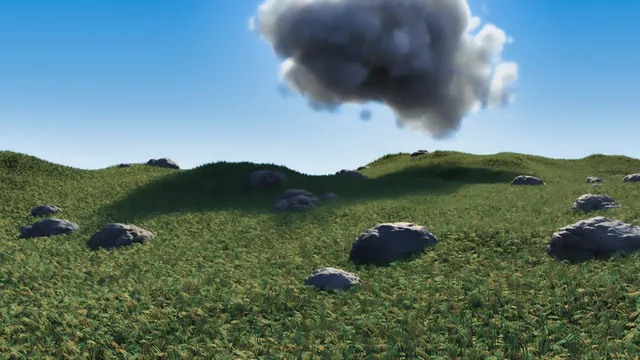
This environment begins with a single procedural rock and grows into terrain, grass, a cloud and a finished still. Its most useful organizing principle is to inspect one system at a time: preview noise as color before using it for displacement, distinguish grass guides from generated hairs, and preserve the camera before expensive scene elements make navigation slow.
The recording uses Houdini’s historical Copy Stamp, Fur, Cloud Rig and Mantra workflows, followed by Photoshop and Luminar 4 image adjustments. The exact Houdini build is unverified. It demonstrates an authored still with acknowledged compromises, not an optimized game environment or a fully documented asset-export pipeline.
Build rock displacement from readable intermediate signals
At 00:01, create a polygon Sphere with enough topology to deform. A frequency of 50 is the initial working example. Mountain demonstrates a quick noise deformation, but the main construction moves into a Point VOP for more explicit control. The same general noise-and-displacement approach appears in the procedural planet lesson; this environment develops a different shape and surface treatment.
First connect point position to color to inspect the input, then feed position into Unified Noise. The automatically selected input is initially wrong and is moved to the noise’s position input. Route the scalar noise through Fit Range and into color. This makes the pattern and contrast visible without simultaneously changing the mesh.
At 05:00, connect the remapped value to the amount input of Displace Along Normal, and its displaced position to the geometry position output. Reduce displacement scale when the result expands too aggressively. Noise frequency changes the pattern; Fit Range changes how its values are distributed; displacement scale changes the strength of the geometric effect. Keep those roles separate while judging the silhouette.
A color ramp temporarily produces lava-like and blue “magical” variations. The instructor first edits the ramp at the wrong level, then changes it through the exposed controls at the geometry level. These are color experiments, not separate simulations or emissive-material demonstrations. Increasing the sphere’s resolution makes the detail smoother but slows interaction, so the working mesh is reduced again while the pattern is developed.
Layer striations, warped coordinates and small divots
At 13:07, add another noise layer and preview it through a separate Fit Range and color connection. When its color does not respond, the missing connection from the noise is the problem. Stretching the frequency relationship creates striation-like bands. Add that contribution to the existing displacement, with a Multiply and constant controlling its strength and sign. A negative contribution pushes into the surface rather than raising it.
The next distinction is between changing the final displacement and changing the coordinates from which a noise is sampled. At 17:02, Curl Noise is added to position before the downstream noise evaluation. This distorts the sampling pattern, breaking up the overly straight bands. The color preview of those coordinates can exceed the familiar display range; it is a diagnostic view of data, not a finished albedo map.
A further high-frequency pattern supplies divots. The instructor tries different noise shapes, adds coordinate distortion, and multiplies the detail by a broader mask to restrict its distribution. Inspecting that multiplied result as color shows where the detail will appear before it is added to displacement. A negative strength turns protruding features into recesses.
Several later mask experiments do not put the divots where intended: they remain concentrated in cracks or become too faint to see. The chosen result returns to a more broadly distributed detail pattern. Do not treat the attempted crack-exclusion mask as a successfully completed control. The narration also does not preserve every final wire and numeric setting for the VOP network, so the video remains necessary for exact reconstruction.
At 28:00, a ramp maps the combined result to stone-like colors with darker creases. The material is made rougher, with metallic removed and reflectivity reduced. Darker cracks here come from the procedural signal; the lesson does not demonstrate an ambient-occlusion bake.
Produce rock variation on a simple terrain
At 31:00, expose a noise position-offset parameter and verify that changing it actually changes the rock. The first promoted parameter is confusing in the interface; the instructor revisits the node and tests the visible result before proceeding. This is the shape-variation control used for the copies.
Create a 100-by-100 Grid, give it enough divisions and deform it with Mountain for simple terrain. Scatter points on that surface, reduce relaxation for a less evenly spaced arrangement, and lower the count to keep the scene workable. Copy Stamp distributes the rock. When evaluating the dense copies becomes expensive, the source sphere returns to a frequency of 50.
The stamp setup enables stamping and defines an offset from a point-number-based random value remapped into a zero-to-1,000 range. The upstream noise offset reads that variable from the copy node, producing rocks with a shared style but differing shapes. A separate point-number variation changes scale, with 0.5–1.5 used as a trial range. The copy transform’s cumulative behavior is disabled during this setup.
The captions describe the expression pieces but not a reliable complete code listing. Confirm names and paths in the recording rather than inventing a ready-to-paste expression. Inspect several copies for both shape and size variation; changing only size would leave the original noise pattern repeated. Finally merge the rocks with the terrain and give the ground a brown color.
Derive a grass surface and separate guide density from hair density
At 42:02, Boolean the ground against the rocks to obtain terrain without the occupied rock areas. Preserve this result as OUT_GROUND and Object Merge it into a separate grass object. The visible environment can still contain the intact ground and rocks; this derived surface is specifically the grass-growing region.
Use Add Fur on that surface, with no animated skin supplied. The resulting setup separates the guide curves from the generated hair. Shorten the guides and begin with a modest guide density. Increasing generated-hair density fills between those guides, while thickness determines the appearance of the individual grass strands. These are different controls, and the displayed yellow guides are not a count of every rendered blade.
The first hair render has trouble loading the geometry. At 50:02, the instructor switches the Hair Generate rendering mode to use SOP geometry, making the generated geometry available before rendering. The captions call this “sub geometry”; the guide uses the intended SOP-geometry terminology without claiming an identical menu label in all versions. The next render shows the grass, allowing material work to continue.
The hair shader uses a warmer root and green tip, with the transition moved closer to the root. Reduce the reflective response that makes it look like shiny hair. Add an Environment Light with the instructor’s existing HDR image, then judge shadows and color in that lighting. A generated density of 1,000 is considered too costly; 300 is a more workable trial and is temporarily reduced again for grooming.
Groom variation and repair the patchy appearance
At 55:03, use a guide-length process. Separate minimum and maximum operations initially fail to give the intended random range. Selecting the actual randomize behavior resolves it, with 0.1–0.4 used as an initial length range and the seed tested to confirm variation. The range is later widened to 0.6 at the upper end.
Shader variation adds differences between strands. The hue range is tried around -0.1 to 0.1, while saturation is adjusted to avoid excessive desaturation. Guide Bend adds curvature, with 15 degrees as an initial angle and further randomness introduced. A Hair Clump operation initially pulls the guides too strongly; reduce the clump size and tightness for a subtler effect. One profile adjustment does not behave as expected, so the source should not be read as a complete explanation of every clump parameter.
The grass still appears patchy despite a generated-hair density of 300. At 01:04:00, the guide density is increased from 5 to 100, giving the groom more local variation and a better-looking distribution in this scene. This is a useful diagnostic distinction: more rendered hairs cannot by itself provide independent guide shapes everywhere.
The instructor accepts the result especially at middle and far distances and would compose with less grass in the immediate foreground. Retain that judgment when assessing the asset. The lesson does not establish that the same groom is suitable for a close-up or animated wind shot.
Assemble and refine a cloud within the chosen composition
At 01:07:01, preserve the current view as a camera before placing the cloud. Temporarily hide the expensive grass while building a sphere-based cloud shape. IsoOffset and Scatter produce points in a volume; copy spheres onto them. An unwanted offset is corrected by centering the source sphere before copying. The setup then uses Copy Stamp for variation and Boolean Union to combine the lobes.
Scale variation initially allows shapes that are too small. Fit the random range away from zero; trials include 0.3–1 and 0.5–1.5. The Boolean inspection still shows some internal geometry, so it is not evidence of a perfectly cleaned deliverable mesh. Its role is to provide a useful source shape for Cloud Rig.
The generated Sun and Sky lights are removed in favor of the existing environment lighting. The cloud is unexpectedly absent in the viewport but present in the render and casts shadows. Check the render before diagnosing that display discrepancy as missing source geometry. Increasing sampling divisions improves the cloud edge, while Cloud Noise and density alter its form and light transmission. An error during an interactive change is handled by stopping and restarting the render.
An experiment expands the source into a broader cloudy sky with many more spheres. The instructor prefers the earlier single cloud and returns to that shape. The scene remains slow because the Scatter count is still 1,000; reduce it to 100 as well. Restoring the source dimensions alone does not undo every costly setting from the rejected experiment.
The final render retains a cloud edge that could use more resolution. The guide does not silently replace that compromise with a perfected volume setup. Sampling divisions, shape complexity and ongoing background renders all matter to the cost of the iteration shown here.
Render with alpha, then distinguish compositing from camera effects
At 01:23:00, restore the grass, render the current frame from the chosen camera in Mantra, and save the image as PNG. Inspect the alpha channel before leaving the render viewer. The black-looking empty background is useful for replacement only if the saved image actually preserves the required transparency.
In Photoshop, add a layer with a pale-to-blue gradient behind the scene to supply the sky. The source then uses Luminar 4 for exposure, contrast, sky/color adjustments, reduced structure, denoising and warmth. These are recorded finishing choices, not tools required or executed for this article. Denoising softens cloud detail and moves the result toward a painterly look, which the instructor accepts for the background.
No depth of field was rendered. The later softening is described as a visual approximation, and it should not be confused with camera-based depth of field or a depth-aware composite. The finished still combines procedural geometry, generated grass, a volume cloud and a gradient background. Its useful review criteria are distinct: varied rock silhouettes, grass excluded from rock footprints, coherent guide variation, a readable cloud and a saved alpha that supports the intended background replacement.