
Maya & Python Scripting / Maya / Python
Day 3 - Python Data types for Maya | Maya 30 Day Introduction to Python
Written guide
Playing loads YouTube content. YouTube processes data after activation.
Watch on YouTubeIf the player is blocked or unavailable, use Watch on YouTube.
Python tools in Maya pass around several kinds of information: numbers, object names, selections, and collections of returned values. Knowing which kind you have is often the difference between manipulating the intended object and sending the wrong argument to a command. This lesson introduces the main data containers, shows how variables retain results, and ends by retrieving a newly created sphere’s name.
The examples are introductory. They establish how to inspect values and recognize their structure, rather than teaching every operation available on each type. The recording does not identify the exact Maya or embedded Python release. One Maya node-labeling error in the narration is corrected below using Autodesk’s command and node references.
Inspect the value’s type instead of guessing from its appearance
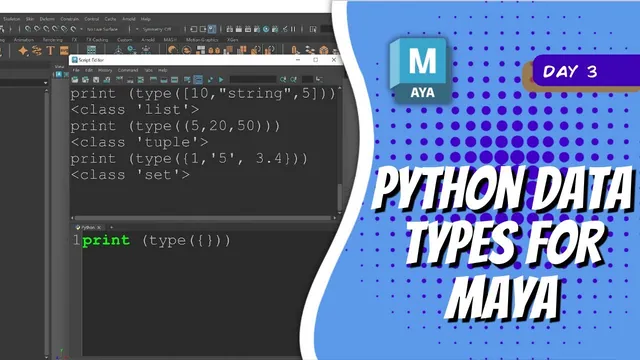
At 00:00–03:01, the instructor uses print(type(...)) to inspect examples. The inner type call identifies the kind of value; the outer print makes that result visible in the Script Editor. The integer 10 reports an integer type, while 3.14 reports a floating-point type. Complex numbers are introduced as another numeric type, but the lesson does not develop a Maya workflow that uses them.
This distinction is about the Python value, not how an artist happens to read it. A whole-number count and a fractional amount can look similar in a user interface while having different types in a script. When a value comes from another command or earlier line of code, inspect it directly before assuming that it has the structure you expect.
For a first exercise, run the type check separately on a number and on the same characters enclosed in quotes. The output should change. If it does not match your expectation, inspect the actual expression you executed, including whether only part of the Script Editor text was selected.
Keep text distinct from numeric data
During 02:00–05:00, strings are introduced using single and double quotes. Both delimit text. Choosing one style can make it easier to include the other quote character inside the string; there is no need to treat single quotes as a requirement of the language.
A single character is still a string in Python. So is a sequence of digits enclosed in quotes. For example, 10 is a numeric value, while '10' is text. The characters look numeric, but the quotes change what the expression creates.
The recording also distinguishes printing a string from printing its type. If the goal is to see whether quotation marks are included in the text, printing only type(...) cannot answer that question. Inspect the value when checking its content, and inspect the type when checking what kind of data it is.
This becomes useful in Maya because node names are strings. A name that ends in a digit remains text; it does not become a number because part of the name contains one.
Choose a collection by its access and editing behavior
At 05:00–09:01, the lesson compares lists, tuples, sets, and dictionaries. They all collect information, but they do not offer interchangeable access rules.
| Collection | Form used in the lesson | Main distinction |
|---|---|---|
| List | [10, 3.14, 'name'] |
An ordered collection whose items can be changed |
| Tuple | (5, 20, 50) |
An ordered collection whose item references cannot be reassigned in place |
| Set | A nonempty collection in braces | An unordered collection, not a positional sequence |
| Dictionary | {'key': 'value'} |
Values associated with keys |
Lists and tuples can contain mixed types. The lesson also mentions nesting collections. Tuple immutability needs a precise interpretation here: the tuple’s entries cannot be replaced in place, but an entry can refer to a mutable object such as a list. The nested object is not automatically frozen. Python’s data-structures tutorial makes this distinction explicit.
The dictionary example initially uses the wrong punctuation and is corrected to a colon between each key and value. Braces alone do not tell you everything about the container; the key-value structure matters. Inspecting the resulting type is a useful way to check that an introductory literal actually created the intended collection.
An ordered collection gives you a stable positional way to ask for an item. That is the property the sphere example will use. A set should not be treated as a list with index positions just because it also contains several values.
Assign intermediate results to names
During 09:01–11:00, the instructor assigns numbers to variables and combines them. The lesson’s arithmetic can be expressed as:
a = 34
b = 3.14
c = a + b
print(c)
The variable names make the intermediate values available to later statements. Changing an input and running the calculation again changes the result without requiring the expression for c to be rewritten.
The rerun is important. This is ordinary sequential Python execution: c = a + b evaluates the expression when that statement runs. It does not create a permanent live dependency that automatically updates c whenever a changes afterward. Re-execute the assignment when you want a new result.
Variables can also refer to strings, lists, or other objects. The next step uses this same mechanism to retain the return value from a Maya command instead of a hand-entered number.
Capture the sphere command’s result before extracting a name
At 11:00–14:01, the instructor imports maya.cmds, creates a polygon sphere, and stores the returned value. Printing that value reveals a list of strings. List indexing starts at zero, so the first returned item can be extracted with [0].
This short example follows the demonstrated operation, with descriptive variable names:
import maya.cmds as mc

sphere_result = mc.polySphere(name='mySphere')
print(sphere_result)
sphere_transform = sphere_result[0]
print(sphere_transform)
Each execution of the creation call creates a sphere. Inspect the returned names rather than assuming a repeatedly requested name will always identify the same scene object.
The narration describes the second returned item as the sphere’s shape node. That description needs correction. Autodesk documents the command as returning the object name and node name; the polySphere node is the generator in the construction history, not the mesh shape itself. Index one in this demonstrated creation result should therefore not be taught as a general route to a mesh shape. See the polySphere command and polySphere node references.
The essential workflow remains useful: capture a command’s result, inspect its type and contents, then extract the particular item the next operation needs. That habit avoids passing an entire returned list where a single object name is required, while also preventing incorrect assumptions about what each returned name represents.