
Houdini & Procedural Workflows / Houdini / Python
Day 3 - Python Data Types for Houdini | Houdini 10 Day introduction to Python
Written guide
Playing loads YouTube content. YouTube processes data after activation.
Watch on YouTubeIf the player is blocked or unavailable, use Watch on YouTube.
Before a Houdini script can combine values or store results, it helps to know what those values are. Day three uses the Python Shell to inspect numbers, text and containers, then assigns them to variables and compares numeric addition with string concatenation. It builds on the day-two hou module lesson, but these exercises use Python itself and do not create Houdini nodes.
The snippets below normalize the narrated syntax into small Python 3 examples; they are not a character-for-character transcription of the screen. The recording does not identify its exact Houdini or embedded Python version. The type survey is introductory rather than an exhaustive list of Python’s types.
Ask for the type of an actual value
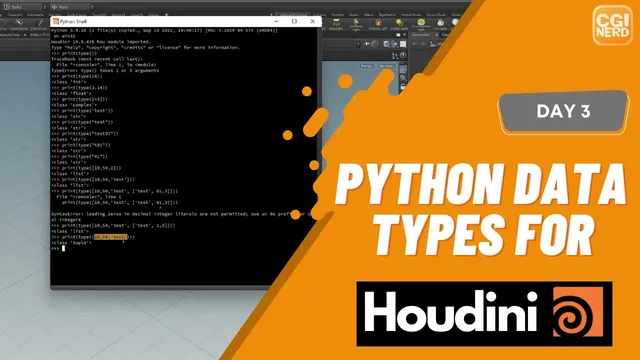
At 00:47, the instructor combines print() and type() to display a value’s type. Calling type() without the required information produces an error. Supply the value inside its parentheses; the outer print() displays the result. The shell’s up-arrow history makes it convenient to edit the preceding experiment instead of typing it again.
print(type(10))       # int
print(type(3.14))     # float
print(type(2 + 5j))   # complex
print(type("10"))     # str
The comments name the expected types; Python’s actual output includes the class representation, such as <class 'int'>. Whole-number examples use int, decimal-point examples use float, and the j suffix supplies the imaginary component of a complex number. Complex arithmetic is introduced only as an available type, not developed for a Houdini task here.
At 02:48, strings show why appearance alone is insufficient. A sequence of digits enclosed in quotes is text. Single and double quotes both delimit strings, provided they are paired correctly. The source corrects an omitted character while entering an example. If an expression fails before printing its type, inspect its delimiters before reasoning about the intended value. Python’s introductory tutorial supports these number and text distinctions.
Compare containers by how their contents are addressed and changed
At 03:48, the lesson introduces lists, followed by tuples, sets and dictionaries. These normalized examples show the notation being discussed:
| Container | Example | Useful distinction |
|---|---|---|
| List | [10, "test", [1, 2]] |
Ordered sequence whose items can be changed; nesting is allowed. |
| Tuple | (10, "test") |
Ordered sequence whose own item slots cannot be reassigned. |
| Set | {10, 20} |
Collection of distinct elements; do not address it as a positional sequence. |
| Dictionary | {"key01": 10, "key02": 20} |
Mapping from keys to values. |
The source’s list example initially contains a leading-zero integer literal and fails to parse. Remove the unwanted leading zero from that ordinary decimal literal. If a leading zero is meaningful text, such as part of a label, keep it inside a string instead. A syntax error in one nested item prevents the entire expression from being evaluated.
The captions call tuples “immediable”; the intended term is immutable. This applies to the tuple’s own structure, not a promise that every object it contains is immutable. Likewise, calling a set an “unordered list” is an analogy, not a statement that it supports list indexing. Python’s data-structures tutorial clarifies these container distinctions and that an empty set uses set(), since {} creates an empty dictionary.
For the dictionary example at 06:50, separate each key from its value with a colon and separate entries with commas. The source briefly refers to an “index value,” but the relevant lookup model is a key associated with a value, not the first or second position in a list. No detailed indexing or container-editing program is demonstrated in this lesson.
Bind names, then track reassignment
At 08:09, assign 10 to a and 3.14 to b. Printing the names retrieves their current values; adding them performs numeric addition.
a = 10
b = 3.14
print(a + b)  # 13.14

a = b
print(a)      # 3.14
print(a + b)  # 6.28
The later result changes because a has been rebound. It no longer refers to the earlier integer. Read a shell experiment in execution order: the most recent assignment matters, even if the original assignment is still visible above it.
The next example resets the values to a = 10 and b = 20, then assigns c = a + b and prints 30. This stores the result of evaluating that expression at the time of assignment. It is not a Houdini parameter reference that automatically recomputes whenever another variable changes. That distinction becomes useful when moving between interactive Python and node parameters.
Join text deliberately, including its spaces
At 10:50, variables hold strings instead of numbers. The same + symbol now joins the text. Python does not insert a separator merely because two variables are involved.
my_string = "This is a string"
my_string_two = "another string"
print(my_string + my_string_two)
print(my_string + " " + my_string_two)
The first output runs the final word of the first string into the first word of the second. The second adds an explicit one-space string between them. This reproduces the lesson’s troubleshooting step near 12:01: fix the expression by supplying the missing separator, rather than expecting the stored strings to infer formatting.
For each experiment, inspect the value, its type and the last assignment that produced it. Those checks distinguish quoted digits from numbers, a tuple from a list, and a changed variable from an arithmetic error. Detailed string manipulation and practical parameter editing are left for later lessons.