
Houdini & Procedural Workflows / Houdini
Low Poly Hard Surface Drone Character Houdini Modeling Tutorial
Written guide
Playing loads YouTube content. YouTube processes data after activation.
Watch on YouTubeIf the player is blocked or unavailable, use Watch on YouTube.
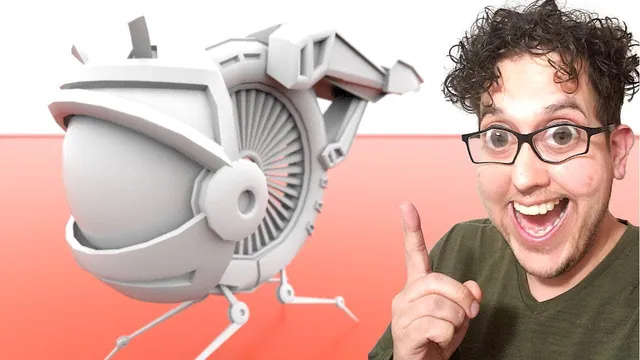
This extended Houdini modeling session develops an insect-like mechanical drone from a ring-shaped body, a large front lens assembly, four articulated-looking legs, a layered tail, and a central turbine. It follows the actual design process: block in masses, reuse parts, inspect the assembled silhouette, add mechanical transitions, and remove details that weaken the result.
The exact Houdini version is unverified. The recording lasts more than three hours and includes long stretches of interactive selections and adjustments that are not numerically narrated. This guide reconstructs the supported construction and decision sequence; it cannot replace the video for every face selection, transform, or final Sweep connection. Concept art is consulted on another monitor, but its dimensions are not supplied.
The finished object is a low-poly modeling result intended as a possible game character. No final polygon budget, UV layout, materials, rig, animation, collision mesh, export, or game-engine test is demonstrated. Mechanical features imply how the drone might work without establishing a functioning mechanism.
Block the body and lens before resolving the details
At 00:33, begin inside an empty Geometry object with a Torus. Rotate it into the desired plane and adjust its radii for the main ring. The instructor recognizes that the initial scale is much larger than the small bug-like drone being imagined, but chooses to block the design first. A later final rescaling is proposed; a completed scale-normalization step is not established by the transcript.
Add a Sphere in Polygon Mesh mode for the front assembly. Merge it with the ring so the proportions can be evaluated together. The instructor also demonstrates using display and template flags to see the surrounding geometry while editing one part. These are visibility tools, not connectivity operations: merging separate components does not weld them into one surface.
The sphere’s orientation is chosen partly to make unwanted pole geometry easier to remove. Blast away the unneeded faces, then branch and transform retained portions to create the lens housing. Stretch, rotate, and edit the remaining shapes while preserving useful straight edges. A Boolean is considered as a possible shortcut, but the instructor continues with direct point and edge modeling.
Around 12:00, a component-aligned handle complicates a desired vertical move. Switch to World alignment so the movement follows the scene axes. This is worth checking before compensating with several small transforms: the selected component may be correct while the manipulator uses the wrong frame of reference.
An early branch later reports an invalid group. Instead of rebuilding the entire graph, the instructor isolates the desired geometry with a new Blast selection, uses Delete Non Selected to keep that portion, transforms it, and merges it back. A 180-degree rotation forms the opposing part of the front shape. At this stage the pieces are visually arranged; the gaps and mechanical transitions are addressed in the detail pass.
Build one leg assembly and propagate it to four positions
From 17:05, use a narrow Box as the first leg segment. Scale selected faces to taper it, then rotate and position it against the ring. The first goal is the four-legged silhouette, so the instructor explicitly postpones exact attachment details.
Transform branches rotate and reflect the original leg into the other positions. Negative scaling is used for mirrored copies, followed by Reverse nodes where needed to correct the resulting surface orientation. Inspect face orientation on the actual branch instead of applying Reverse automatically to every copy; a later part of the recording removes a Reverse that proves unnecessary.
Add a capped Tube near the first segment as a joint-like component. Adjust its radius, height, rotation, and center to seat it against the leg. A transformed attempt to make another elongated segment gives an awkward shape, so the instructor starts that part again from a fresh Box. This is a deliberate simplification: reusing a component is useful only while its inherited shape remains helpful.
Build the longer lower section and another smaller end section, tapering a face toward a point. The whole body/leg arrangement is moved upward to make room for the final ground-contact shape. Judge the leg from several views; it needs to read as a descending chain instead of a set of unrelated boxes that happen to overlap in one projection.
Merge the pieces of the original leg before the transforms that create its counterparts. This lets subsequent additions propagate into all four locations. Put the leg and body construction in separate labeled network boxes, and reduce unnecessary wires into a single assembly output where practical. The instructor later considers subnets as another organizational option, but does not complete a general asset-packaging workflow.
Develop the tail from layered box forms
The rear construction begins around 37:25. Use a polygon-mesh Box with enough divisions to shape the profile. Flatten selected regions, move edges, and extrude/inset faces to suggest a track or channel associated with the main ring. The overall tail becomes a layered structure whose profile suggests insect wings, although actual wings are not part of the finished design.
A recurring source of trouble is accidental selection. Around 48:02, an extrusion looks wrong because an extra face was included. The instructor removes the faulty operations, selects the intended faces again, and repeats the extrusion. Inspect the selection in another view before trying to repair the resulting shape with additional edits.
Branch from an earlier stage of the tail to make a related layer. The recording deliberately takes this branch before the wing-like extensions, so the new component does not inherit details it does not need. Flatten and reposition it, add an edge loop, and extrude the necessary region downward. Adjust inner edges so the surfaces do not collapse into each other.
A further transformed copy creates an upper part. It is rotated, scaled, and moved into place, then locally widened or narrowed to fit the rest of the assembly. This combines procedural reuse with direct modeling: the source establishes a shared visual shape, while a branch-specific Edit adapts it to its location.
At about 61:01, collect the tail network and check its output. Moving nodes while organizing the graph accidentally breaks a connection, which is restored before continuing. Reorganization should leave the displayed geometry unchanged; if a component vanishes immediately after tidying the graph, inspect the wires and display flag before assuming the modeling data has been lost.
Construct the central turbine and inspect its radial orientation
Around 62:00, the instructor tests a Sphere inside the ring and a smaller Torus for the turbine structure. The sphere is later removed in favor of an open center. Inset and extrude selected ring faces to create tracks on the inner and outer areas.
Difficult selections lead to a named group, ring, for an intended extrusion region. The group is placed at the appropriate point in the chain and referenced by the extrusion. Another downstream connection is then corrected so the modified ring reaches the final Merge. The group and the output wire solve separate issues: one restricts the operation, while the other determines whether its result appears in the assembly.
Make a thin Box-derived piece for the repeated turbine elements. Edit its cross-section and taper, then reference half its dimension into an offset so it sits on the desired side of its origin. The recording tests the sign of that half-dimension offset. This is more adaptable than independently typing a size and offset that could drift apart later.
Create a Circle as the distribution path. The first Sweep attempt fails to produce the intended result, and a Copy Stamp test places the pieces but leaves them facing the same direction. Around 83:02, the instructor returns to Sweep and gets the radial arrangement working. A Transform then adjusts the component so it points toward the center and fits between the surrounding ring surfaces. Increasing the circle’s divisions increases the visible repetitions.
The final Sweep wiring is not fully explained in speech, and the instructor explicitly does not know why the earlier attempt failed. Consequently, the source supports the observed radial result and the alignment checks, not a complete socket-by-socket reconstruction. If following the video, verify that the repeated pieces face toward the center and fit within the ring before increasing their count. More copies will not correct an orientation error.
Finish the blockout by repairing branches and adding thickness
Between roughly 88:03 and 94:01, the instructor revisits parts affected by earlier group and branch edits. Clearing an obsolete group reference restores one transformed section; direct point and edge adjustments realign surfaces. In another case, removing a duplicate downstream Edit and making the change at the shared source fixes both related parts together.
This is a useful dependency check for a reused model: if two components should remain related, decide whether the correction belongs before or after their branches separate. An upstream correction can update both; a downstream correction changes only one. The recording contains examples of choosing the wrong location and moving the work to the useful stage.
Add PolyExtrude thickness to thin shell portions and enable Output Back where the demonstrated surface needs a back face. Inspect the result rather than assuming the exterior silhouette proves the object has volume. Reverse is tried on one area and then removed when the instructor finds that it was not actually inside out.
The model is now recognizable at the intended viewing distance, but the instructor calls it a block-in. Gaps, exposed intersections, and unexplained leg attachments still make it look assembled from loose pieces. The next pass improves that visual logic without claiming engineering accuracy or a single watertight shell.
Add attachment recesses and use PolyFill for the open housing
The detail pass starts around 95:03 by extruding recesses into the ring where the legs enter. Inset first, then extrude inward, checking that the cut does not pass through the opposite top surface. Adjust the leg shape to fit the opening more convincingly. Folding the legs into the body is discussed as a future animation concern, but no working retraction animation is shown.
The instructor proposes an outer fender or shield to cover exposed attachment geometry. Before resolving that design, narrower inset/extruded panel details are added to the body. Selection through the model is checked in profile and wireframe so the operation does not accidentally affect internal faces.
The front housing still has an unwanted open region. An attempted shortcut removes a Blast and flattens a copy of the sphere, but downstream dependencies break, so that approach is undone. At 107:02, the instructor identifies the correct tool: PolyFill, rather than the initially selected similarly named option, fills the intended opening.
The successful result is the PolyFill branch, not the abandoned flattened-sphere construction. This distinction matters when rebuilding the lesson: keeping both approaches would add unnecessary or conflicting geometry. Inspect the completed housing in the assembled model after filling the hole.
Create a capped Tube as a connector near the front and detail it with repeated insets and extrusions. Unexpected selection/extrusion behavior is corrected by changing the tube to polygonal geometry in the demonstrated setup. Mirror the detailed connector to the other side and correct orientation as needed. Keep this component available for reuse in the legs so the same joint language appears throughout the design.
Reject a bulky shield and refine the existing surfaces
From about 116:01, create a narrow seam around the body, checking that it continues at a reasonably consistent width. Accidental through-selection again includes unwanted faces, so the instructor retries the selection. Small edge and point adjustments align the seam around changing surfaces.
A larger outer shield is then extruded and shaped to conceal the leg mechanism. Several edits flare it outward, but the instructor eventually judges that it damages the drone’s overall design. At 131:03, this bulky construction is removed while retaining the earlier seam detail.
The replacement is more restrained: lower and expand selected inside edges, then adjust adjacent points so the opening looks intentionally shaped around the mechanism. Watch for surfaces folding over themselves during these moves. The recording corrects the edge position instead of retaining a large cover simply because time was spent modeling it.
At 138:00, continue adding small mechanical accents through alternating inset, outward extrusion, and inward extrusion. These create recesses, lips, and ridges on selected rear and front regions. Some spatial relationships remain acknowledged compromises. The instructor repeatedly checks the combined model to decide whether a detail improves the design at its intended viewing distance.
The front assembly is also resized and repositioned to reduce awkward exposed intersections. Branch selection and display flags are especially important here: more than once, a supposed missing edit turns out to be the wrong side or the wrong node being viewed. Verify the active branch before duplicating work.
Reuse the detailed joints and resolve local intersections
Around 150:00, bring the previously detailed cylindrical connector into the leg construction as a joint. Transform it to the first joint location, then make another appropriately scaled placement for the next connection. A missing second copy is traced to an incorrect Merge arrangement and fixed before placement continues.
The new joints expose proportion problems in the original boxes. Taper the adjoining leg segments and adjust their positions to fit the smaller connectors. Reusing a detail does not mean the blockout dimensions remain correct; the surrounding forms may need to adapt so the assembly appears designed together.
Return to the tail around 162:01 for additional panel detail. Use PolyExtrude’s Individual Elements mode where separate inset/extruded details are desired; connected-component behavior would produce one shared operation across the region. Later edits change or remove inherited nodes where they conflict with the new detail.
Some extrusions intersect adjacent geometry. The instructor raises or lowers selected faces, flattens an area, and moves it forward to reduce those collisions. These are local visual repairs. The recording does not finish with an automated self-intersection check or establish that every hidden surface is clean.
Finish the front silhouette and stop before detail overwhelms it
From 172:03, shape a brim-like detail around the front assembly with successive extrusions and insets. The first operation is started at the wrong point in the graph and discarded; the work is repeated on the intended upper housing branch. Add notches for the antenna area and selected recessed details where the surface appears too flat.
At 179:00, a separate sphere is tried as the antenna’s starting shape, then rejected. The instructor instead extrudes directly from the head geometry, adds divisions, and uses the extrusion controls to curve the feature. The final shape is accepted as a small communication-like detail; its mechanical function is implied rather than modeled.
During the last few minutes, additional repeated insets are tested on other regions. A denser row is reconsidered, switched from individual to connected behavior, and ultimately removed. The instructor stops because further detail risks overworking a design intended to remain relatively low-poly.
The final inspection is of the assembled shaded model. The lesson’s strongest reusable habits are visible throughout: choose the branch before editing, verify selection in another view, reuse a component only while its shape remains helpful, inspect orientation after reflection, and return to the whole silhouette before keeping a detail. Those habits support the finished modeling exercise without implying that the drone has already passed the separate technical work needed for animation or a game asset.