
Houdini & Procedural Workflows / Houdini
How to make a Minecraft Cube in 3D | Houdini Tutorial
Written guide
Playing loads YouTube content. YouTube processes data after activation.
Watch on YouTubeIf the player is blocked or unavailable, use Watch on YouTube.
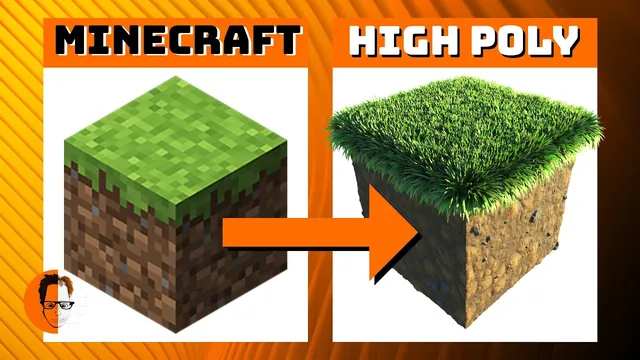
Reinterpret a Minecraft grass block as a detailed still-render asset in Houdini. The lesson builds dirt and stone variation procedurally on a subdivided box, extracts its top surface for a fur-based grass layer, and develops the lighting and hair shader against a game-image reference.
This is a stylized high-polygon reinterpretation, not a game-ready block or a reconstruction of Minecraft’s internal generation algorithm. The recording uses a historical Attribute VOP, fur/hair and render workflow; its exact Houdini version is unverified. Two crashes and a later grass-render problem interrupt the process, and the final shader settings are chosen through comparisons rather than a complete numeric preset.
Reserve space for grass and sample the dirt on points
At 00:35, create a one-unit Box and reduce its height to 0.9, reserving approximately a tenth of a unit for the grass layer. Increase its divisions to about 100 per axis because the procedural color and displacement will be evaluated on geometry points.
Inside an Attribute VOP around 02:04, connect Turbulent Noise to the color output so the pattern is easy to inspect. Choose the alligator noise used in the demonstration, adjust its frequency and offset, then use the pattern to drive a small displacement. The instructor corrects an excessive amplitude toward 0.04. Keep the box’s recognizable silhouette while introducing surface breakup.
The source speculates about Minecraft’s use of Perlin noise. That remark is not needed to reproduce this asset and does not establish the game’s implementation. Here the chosen noise is simply an artistic match for the intended dirt pattern.
Map dirt colors and isolate the stone flecks
At 04:00, add a Ramp Parameter and expose it as the dirt-color ramp. Edit its colors on the parent node rather than expecting the final ramp controls inside the VOP network. Replace the black/white range with dark and lighter brown tones, comparing saturation and hue against the reference.
At 05:06, create a second noise for small gray stone flecks. Increase its frequency, then use a Fit Range to compress much of the signal toward black and retain a sparse bright pattern. Inspect this mask directly before using it to mix colors.
The color mix has three distinct inputs: the dirt color, the chosen stone color and the mask as the blend bias. A mask is not the stone’s final color; it controls where the second color contributes. The instructor briefly connects to the wrong output and corrects the connection before evaluating the pattern.
After the first crash and recovery around 08:05, combine the stone contribution with the displacement. An unscaled addition pushes the surface too far, so another Fit Range reduces the stone contribution before it enters the displacement calculation. This allows the flecks to sit a little proud of the dirt without making the whole block excessively rough.
Save before moving on. Crash recovery restores much of this particular session, but the recording does not establish the cause of the crash or guarantee that a recovery file includes every recent edit.
Judge geometry detail through a consistent render
At 10:03, assign a material, create an environment light with an existing HDR image, and frame the block through a square camera. Increase roughness to move away from a shiny surface and toward the dry dirt appearance sought here. The HDR is an existing input, not generated or supplied by the demonstrated node network.
At 12:00, raise the box divisions from 100 to about 400 per axis. The point-evaluated pattern and displacement become more detailed in the comparison. This increases geometry sampling; it is not a change to an image texture’s pixel resolution. It also increases computation, so the earlier lower-detail stage remains useful for choosing the pattern.
Adjust environment exposure only after the same camera and material are in place. Otherwise lighting changes can be mistaken for changes in the procedural color. The lesson accepts a rendered dirt block before beginning the grass layer.
Extract a top surface without growing grass down the sides
At 13:02, group the top-facing surface using normals directed toward positive Y. Reduce the angular spread until the selection largely excludes the sides. Use Blast with the inverse selection behavior needed to keep that top region.
The displaced surface makes this imperfect: there are small gaps, and the instructor accepts them because the grass will cover them. This is a visual judgment for this asset, not a proof of continuous coverage. A wider angle can include unwanted side faces, which later produces grass down the cube’s sides.
At 15:03, create a separate Geometry object and use Object Merge to import the extracted top surface. This becomes the grass-growing surface. Keep the original cube available as the visible dirt object; the extracted surface serves a different purpose and should not accidentally replace the whole block in the render.
Shape guides, then choose generated-hair density
At 16:00, use Add Fur on the static top surface. The initial guide density is tested around 500–1,000. A length of 0.1 would nominally fill the reserved height if the strands stayed upright, but the lesson bends them strongly, so it uses about 0.2 instead. This is an appearance choice, not an exact one-unit final bounding-box guarantee.
Use the guide Bend tool and try a bend angle of 90, with random angle also around 90, to distribute the bent strands in different directions. Then adjust Hair Generate separately: the initial generated density is reduced from about 100,000 to 50,000, and thickness is increased so the strands read as stylized grass rather than fine hair.
These are two densities with different jobs. Guides shape the groom; generated hairs fill the visible surface. Around 21:00, the instructor finds the render sparse and raises the guide density toward 2,000 and generated density toward 80,000. Compare coverage and silhouette before treating either number as a useful setting for another surface area.
If grass appears on the sides, revisit the normal-group spread on the source cube. The recording makes that correction more than once, including after crash recovery. Verify the imported surface itself rather than trying to hide a selection error with more hair.
Develop the grass material through controlled comparisons
At 18:04, set darker green roots and brighter green tips. At 20:00, enable the shader’s available variation controls so the grass is less uniformly colored. Later, alter the root-to-tip transition to introduce a brown/orange base that quickly becomes green, and disable white hairs and guard hairs.
After another crash around 22:02, some work has to be restored. The instructor also encounters a render that seems unhappy with the grass and tests making the growth surface visible again around 24:01. Rendering resumes, but the transcript does not establish a definitive cause. Treat visibility as a troubleshooting observation, not a universal rule that every hair source must be rendered.
The bright specular appearance is then adjusted by reducing reflection-related intensity and comparing secondary reflection and transmission. Both are temporarily disabled, but the instructor later reenables them because they add the desired liveliness, then reduces their intensity. The final lesson is not simply to turn those features off.
Stop an interactive render before a substantial edit when following the recording’s recovery strategy, save the working scene outside the temporary recovery file, and compare the same camera region after each change. Exact final shader values are not supplied by the captions.
Finish the still while preserving the intended style
At 29:00, let the render finish and compare it with the reference block. The high-detail result has a different perspective, silhouette and surface treatment from the source game image. It is successful here as a deliberate reinterpretation rather than a pixel-for-pixel reproduction.
At 30:04, make final image adjustments to levels, contrast and saturation. An excessive saturation change is undone and replaced with a subtler one. Compare before and after so the grass remains readable instead of becoming harsh or losing tonal variation.
The delivered result is a detailed rendered still. The lesson does not build texture baking, low-polygon optimization, engine export, a reusable packaged asset or a validated crash fix. Its reusable instructional structure is the separation of noise-driven dirt, a distinct stone mask, a selected growth surface, guide shape and final hair shading.