
Character FX & Animation / Houdini & Procedural Workflows / Houdini
Houdini Creature Fur Tutorial
Written guide
Playing loads YouTube content. YouTube processes data after activation.
Watch on YouTubeIf the player is blocked or unavailable, use Watch on YouTube.
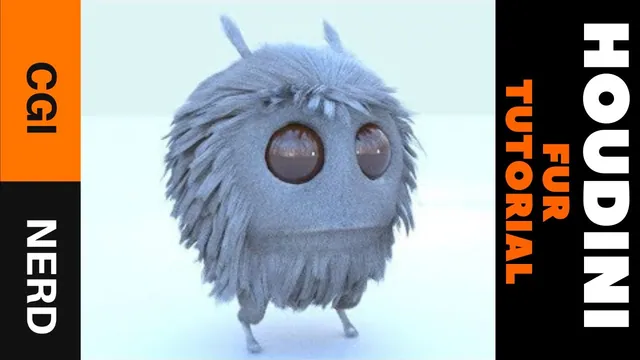
A character can need several fur treatments at once: long body fur, short facial fur, a crest, and different lengths on antennae and feet. This Houdini 17.5 lesson builds those treatments as separate regional grooms, combines them, and generates the final hair for a still render.
The source character and scene are already modeled. The lesson concentrates on guides, their procedural modifiers, manual grooming, and rendered hair density. It explicitly leaves texturing, coloring, and fur simulation outside the demonstration. The final lighting is partly prepared during a pause and described afterward.
Prepare skin regions before creating the grooms
At 00:53, the character is imported through Object Merge from an output Null at the end of its modeling network. A File node importing an OBJ is mentioned as another possible starting point. The important requirement here is access to the character surface on which the hair will grow.
The prepared mesh has groups for the body, face, top of the head, antennae, and legs. These let each groom use a different portion of the same character. The recording shows the groups arranged in separate network branches and merged, while noting they could also have been made sequentially.
Switch to the Grooming menu set and create guides with the character selected. The first result grows guides everywhere, including areas that should remain clear. Restrict the groom to the intended body group before styling it. A guide-density change cannot fix an incorrect skin-group selection: it would simply produce more or fewer guides in the wrong places.
The instructor also notes that regional grooms can overlap on the same faces when different hair layers are desired. The example uses the named regions to organize its styles; it does not establish a universal non-overlapping layout requirement.
Establish body direction before adding small variations
From 05:01, increase the body guide density and length, then use the grooming radial menu—accessed with C in the demonstrated setup—to initialize the guides. Adjust lift and bend to place the hair closer to or farther from the body. The UV-related bend is treated cautiously because the character’s UVs have not been developed in detail, and the top of the head does not initially respond as desired.
Add Set Length from the guide tools to introduce minimum/maximum variation. This node overrides the earlier length setting in the demonstrated chain, so changing the original length control may no longer be the final word on guide length. Inspect where the latest length operation sits before assuming a control has stopped working.
Add restrained clumping, comparing the node enabled and bypassed. The instructor wants some grouping without a sharply spiked or wet appearance. Frizz adds less perfectly straight strands; its frequency and randomness are adjusted to break up the uniformity.
Manual grooming then corrects directions, particularly around the head and lower body. Use the Screen Brush to pull the guides toward the intended flow. Around 12:11, the groom operation is moved earlier in the chain, before the procedural length, clump, and frizz work. This order lets the brush establish the broad direction while downstream operations retain their variation. Brushing only at the end can alter the small-scale shape that those nodes produced.
Use bypass comparisons to distinguish the base groom from its modifiers. A stray guide may need a directional edit, whereas overly spiky clumps need a clumping adjustment; they are different problems even if both look like untidy fur.
Give the face and crest different guide requirements
Create another guide object around 14:02, restrict it to the face group, and increase its density while shortening the guides. The recording tests only 2 segments for this very short fur. A short, nearly straight guide does not need the same curve complexity as a long scraggly strand, although the chosen value is specific to this example.
Initialize the facial guides and inspect their length against the body fur. The face remains substantially shorter. The instructor decides that extra randomized length is unnecessary for this region at this stage; the body treatment is not copied indiscriminately onto every part of the character.
For the top of the head, create a third regional guide object and initialize it. The crest should be longer, but the first tests obscure the antennae. The source settles near a base length of 0.5, then uses Set Length with a randomized range around 0.3–0.6 and adds frizz. Those are scene-specific values; the useful check is whether the crest has the intended silhouette while preserving the visibility of the antennae.
At 20:01, a render check intentionally shows a bald character. Only guides have been created so far. In this setup, the styled guide curves are not the final rendered hair; Generate Hair comes later. A missing fur render at this stage is therefore expected and does not by itself imply a failed skin assignment.
Paint antenna length while grooming its direction separately
Create the antenna guides around 21:01 and assign the antenna group. Automatic initialization does not give the desired flow, so the instructor removes that initialization, tests a Bend, and uses the Screen Brush to follow the antenna’s shape manually.
Ghost the other objects when necessary to see the active guides. Brush each side carefully so working on one antenna does not disturb the other. This is a practical limit of editing in screen space: a good stroke from one view may also reach geometry behind the intended region.
At 26:02, Set Length is controlled through a skin attribute override. Paint the surface to make the tips longer and the lower sections shorter. In the demonstrated grayscale control, white approaches the override’s full length and black approaches zero. The paint changes the local length distribution; it is not a replacement for brushing the direction.
The paint operation is mirrored by default in this symmetric model, which helps the two sides remain consistent. Verify that this behavior suits the character before relying on it. Finish with frizz and randomness after the main direction and length distribution are satisfactory.
Keep the feet short and combine the regional grooms
From 29:07, create a leg guide object and restrict it to the leg group. Initialize its guides, then use a skin-attribute length override rather than the initially proposed randomized-length treatment. Paint shorter values around the feet and lower legs, and black on the soles so the length reaches zero there.
Some guides point upward where the instructor wants them to flow downward. Correct those with the Screen Brush. Increasing density would add more guides with the same wrong direction, so fix flow before deciding whether the region is sparse.
Review all regions together. The source increases density where the top of the head and legs appear light, then saves a new scene version before using Merge Groom Objects around 34:01. This creates one combined groom object for the subsequent generation step while preserving the regional styling developed so far.
The combined object is a workflow consolidation. It does not mean the face, antennae, and body should suddenly have identical length or shape; those differences are the reason for the regional work.
Generate hair and judge density against thickness
At 35:05, run Generate Hair from the merged groom and inspect a render. The generated hair follows the guide styling, but the first result appears straighter in some regions than expected. More guide segments are suggested as a possible explanation for the limited scraggly detail; the recording does not demonstrate a conclusive fix for that observation.
Adjust density on the generated hair object. This is separate from guide density: the guides supply the shapes, and the hair-generation stage produces the visible coverage interpolated from them. The source also discusses blending between the multiple groom regions so their changes are less abrupt.
The instructor tests a density setting of 5,000, then makes the hair finer and reassesses coverage in the render. Thinner strands can require greater density to maintain a full appearance. Later tests move through 10,000 and 100,000, with 100,000 judged excessive because calculation becomes slow; about 30,000 is preferred in this scene. These are values of the demonstrated density control, not verified total strand counts or recommended settings for every creature.
Several thickness values are tried while refining the result. The narration does not consistently identify every thickness subcontrol or its scale, so the transferable procedure is the comparison: reduce thickness, render a representative region, then increase density only as needed to restore coverage. Do not compensate for an incorrect groom silhouette solely by adding more hair.
Read the final still as a grooming result
Around 41:01, the instructor pauses to prepare a cleaner render. On return, the reported changes are a slightly angled camera, an HDR image in the environment light, and a simple three-point lighting arrangement to improve definition. Exact light positions and intensities are not supplied.
The final still demonstrates a single creature with visibly different fur treatments across its body. The instructor also acknowledges that more grooming time could improve it. No simulated motion, deformation-following test, or animation-performance validation is shown; the scene is being prepared for still images.
When following the lesson, inspect the result at three levels: the skin groups define where each style belongs, the guide chain defines its direction and local shape, and generated hair density and thickness define the rendered coverage. Keeping those levels distinct makes it easier to decide whether a problem needs a selection change, a grooming edit, or a rendering adjustment.