
Maya & Python Scripting / Maya / Python
Create a Update Defaults Tool with Python in Maya
Written guide
Playing loads YouTube content. YouTube processes data after activation.
Watch on YouTubeIf the player is blocked or unavailable, use Watch on YouTube.
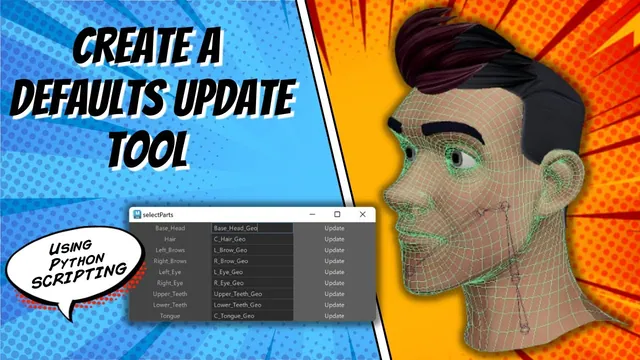
A rigging function that always assumes “the first selected object is the head” makes the user repeat selection work and leaves that assumption hidden in the code. This lesson builds a small Maya interface that stores a chosen object name in a text field. Each row has a descriptive label, a field with a default name, and an Update button that replaces that text with the current selection.
The tool is demonstrated as a standalone window for the base head and hair. Integrating its layout into the larger face-rig window and querying its values from the rig builder are planned next steps. The recording does not establish an exact Maya release or implement persistent settings across sessions.
Separate the displayed role, the UI field, and the scene object
At 00:00–02:00, the instructor demonstrates the intended interaction: select the geometry that should serve as the base head, click Update, and retain its name for later use. This replaces a repeated reliance on the live selection with an explicit field the user can inspect.
Three names have different jobs. The row label explains the role to the user. The text-field identifier lets the Python code find a particular UI control. The text inside that field is the scene object name the rig will eventually use. Confusing those roles causes one of the errors later in the recording.
The field is a useful checkpoint because its contents are visible. Before binding or connecting a rig, the user can see which object has been assigned to the head role. Merely storing a name does not prove the object exists or is appropriate; those checks are not implemented in this lesson.
Build one complete row before duplicating the interface
During 02:00–05:04, the window function checks whether its named window already exists and deletes that UI before recreating it. A three-column grid then holds the label, text field, and button. The example uses compact cell dimensions suitable for this small utility.
The text field receives its own identifier, such as baseHeadField. The first version leaves its text blank so that the layout and update behavior can be tested separately from default values. The Update button initially exists without the final behavior attached.
The first run does not display the window because the show-window call is missing. Adding that call makes the controls appear. This distinguishes constructing a UI from presenting it: successfully creating the window and layout is not enough if the final display operation never runs.
Test this single row before adding more roles. A working row gives later copies a known structure and avoids multiplying an unresolved callback or field-name error.
Pass the field identifier to the update callback
At 05:04–07:05, a separate function is introduced to update a text field. Its argument identifies which field should be edited. The button invokes that function with the base-head field’s UI name.
The recording uses a string command for the button and alternates quote styles to keep the nested string valid. The first attempt passes the wrong identifier and Maya reports that the requested item cannot be found. Replacing it with the actual text-field name fixes that lookup.
Another test successfully edits the field but displays True. The text flag was given a Boolean value instead of the desired object name. This is a different failure from the missing-field error: the UI lookup works, but the content supplied to it is wrong.
When debugging a callback, inspect these questions in order: did the button call the function, did the function find the intended UI field, and did it supply the intended text? Treating them as separate checks makes the error messages more useful.
Accept exactly one selected item before reading index zero
During 07:05–09:01, the callback captures the current selection with mc.ls(sl=True). It checks that the selection length is exactly one before using sel[0] as the field’s text. Otherwise, it raises an error asking for one selected object.
The length check has two purposes. An empty list has no first item to read. A list with several items leaves the intended assignment ambiguous. Accepting exactly one entry gives the Update action a clear meaning rather than silently choosing whichever object appears first.
The lesson then fixes a syntax error in the text assignment and verifies that selecting the base head puts its name into the field. Repeat the test with no selection and with multiple items selected as well as with one valid choice. The error branch is part of the intended interaction, not an unexpected failure to hide.
The demonstrated guard checks selection count. It does not filter for mesh transforms, reject components, or verify whether a particular object is suitable as a head. Those are possible extensions, but they should not be assumed to exist because the single-item check passes.
Add defaults and a second role without mixing their targets
At 09:01–10:14, the base-head field is given a project-specific default name. Closing and rebuilding the window restores that default. This demonstrates initialization from the script, rather than saving the user’s most recent choice persistently.
The three controls are then copied to add a hair row. Its label, field identifier, initial text, and button argument are adjusted to the new role. A label-flag typo is corrected before the two-row interface is tested.
Check the rows independently. Updating the hair row should change the hair field, while the base-head field retains its own value. A copied button that still passes baseHeadField can execute successfully while updating the wrong role.
The closing discussion proposes querying the field text from other code and adding this layout as a tab in the main rigging window. Those integrations are not demonstrated here. The completed standalone piece is the selection-to-field interaction, with defaults and a clear single-selection requirement ready for that later connection.