
VFX & Production / Houdini & Procedural Workflows / Houdini
3D Modeling Character in Houdini | Devlog
Written guide
Playing loads YouTube content. YouTube processes data after activation.
Watch on YouTubeIf the player is blocked or unavailable, use Watch on YouTube.
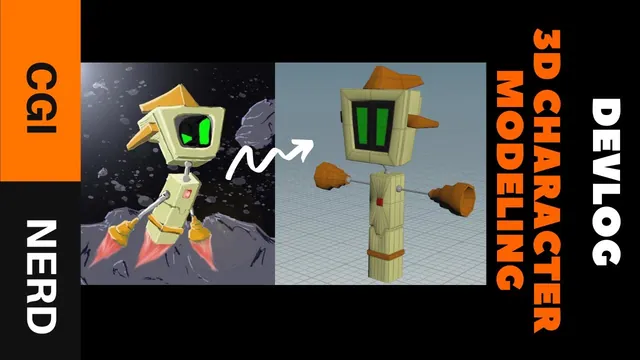
Translate a box-shaped game-character concept into a usable Houdini blockout while keeping the design recognizable. This devlog explains the modeling decisions behind the character, including an abandoned Boolean-heavy approach, unwanted bevel density, troublesome caps and a final proportion adjustment.
It is a narrated process review rather than a complete node-by-node modeling lesson. The result is deliberately rough: topology cleanup, UVs, shaders, texture baking and game-engine integration are not completed here. The exact Houdini version is unverified.
Save a recoverable stage before refining the model
At 00:00, the instructor explains that an earlier complete attempt was lost when the computer locked up near the end of the session. No useful working file could be recovered because the project had not been saved during that attempt.
The practical lesson is to save while the model is still changing. A saved blockout preserves the design and construction already established before another operation introduces a problem. The recording does not demonstrate an autosave or crash-recovery procedure, so its warning should not be read as evidence that unsaved geometry can be recovered afterward.
Treat recognizable stages—basic masses, completed limbs and a proportion pass—as useful save points. This is editorial workflow advice drawn from the loss described, not a backup system configured in the video.
Start with the character’s main shape language
At 01:01, the character begins with two boxes, one for the head and one for the body. Those primitives fit the concept’s dominant visual language. Starting from these masses lets the relationship between head, torso and overall silhouette remain visible while detail is added.
Extrusions and edge loops then develop the shapes. The repeated operations are simple: extrude, move components, add a loop and push or pull the resulting edges. Their value is controlled placement of detail around the intended form.
The instructor compares this with the lost version, which relied more heavily on Booleans followed by cleanup. Both approaches produced usable shapes, but the second attempt favors extrusions and loops. That preference is specific to this character and the instructor’s experience; the source does not establish one method as universally better.
At 02:00, the chest reveals a limitation of the chosen approach: pinching and elongated faces. The instructor accepts them for the working version and plans to revisit the topology. A readable silhouette therefore does not establish clean deformation topology. Inspect the chest separately when deciding whether the asset is ready for rigging or closer presentation.
Replace an unhelpful operation without hiding the unfinished work
At 03:02, beveling creates more geometry than the instructor wants. The demonstrated response is to add edge loops and adjust components manually to obtain the desired detail. The video does not provide exact bevel settings or a general diagnosis of the tool; it reports that the result was unsuitable for this model at this stage.
The choice of Houdini also has historical project context. The instructor was familiar with it and already held an Indie license, while being less familiar with Blender. This explains the tool choice in the recording; it is not current licensing guidance or a comparison test of modeling speed.
At 05:00, the visible color is still point data rather than a completed shader and texture setup. UV creation and baking that data into texture maps are proposed as later work. Keep the distinction clear when evaluating the blockout: a colored viewport model is not evidence of a finished textured asset or a verified engine export.
Build the limbs, then mirror and inspect their facing
At 06:03, tubes and spheres supplement the boxes for the neck and arms. The instructor judges these rounder forms compatible with the overall box-shaped character. Use the whole silhouette as the comparison, rather than requiring every local part to use the same primitive.
At 07:02, capping causes repeated trouble. Several replacement attempts are described, and the instructor concludes that restarting a problematic section can be faster than continuing to repair it. The source does not identify a definitive cap failure or supply a universal repair sequence. Its useful production observation is narrower: compare the effort of rebuilding a small section against the effort already spent preserving it.
For symmetry, the instructor uses a Transform with X scale set to −1, rather than the dedicated Mirror tool. Around 08:00, the mirrored side’s facing is corrected by reversing normals in the demonstrated workflow. Inspect the reflected geometry before accepting it; symmetry of position alone does not show whether the surface facing is suitable. The captions do not establish a separate seam-welding or topology-merge step.
Compare the proportions with the concept before calling the blockout done
At 08:00, the final comparison reveals insufficient contrast between the head and body. The 3D character does not yet read as skinny and long as the concept. A proportion adjustment restores more of that relationship and improves the instructor’s assessment of the result.
This is a useful final check because it returns to the design goal after the component-level work. Judge the relative masses and silhouette, then record the remaining technical tasks separately. Here the accepted outcome is a quick character blockout with unresolved chest topology and planned surface preparation—not a completed game-ready character.